

In its early days, Zendesk promised to simplify customer service. However, as the platform grew, so did its complexity. From choosing a plan and calculating the total cost of ownership, to deciphering unclear subscription cancellation terms and downgrading plans, Zendesk increasingly makes it difficult for companies to achieve the simplicity it once promised.
.png)
What Zoho Desk can do for your business
✔ Seamless integration
✔ Faster implementation
✔ Transparent pricing
✔ Free migration
✔ Simplified onboarding
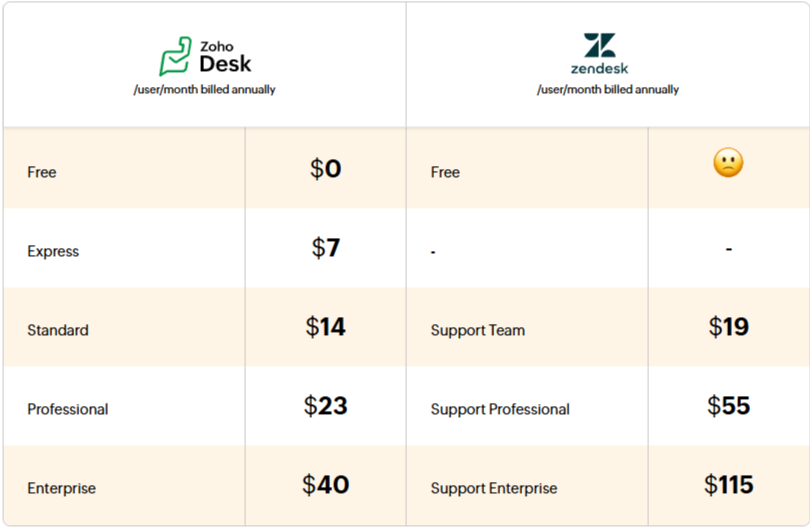
Cost comparison
Feature comparison
Do more in less time with AI
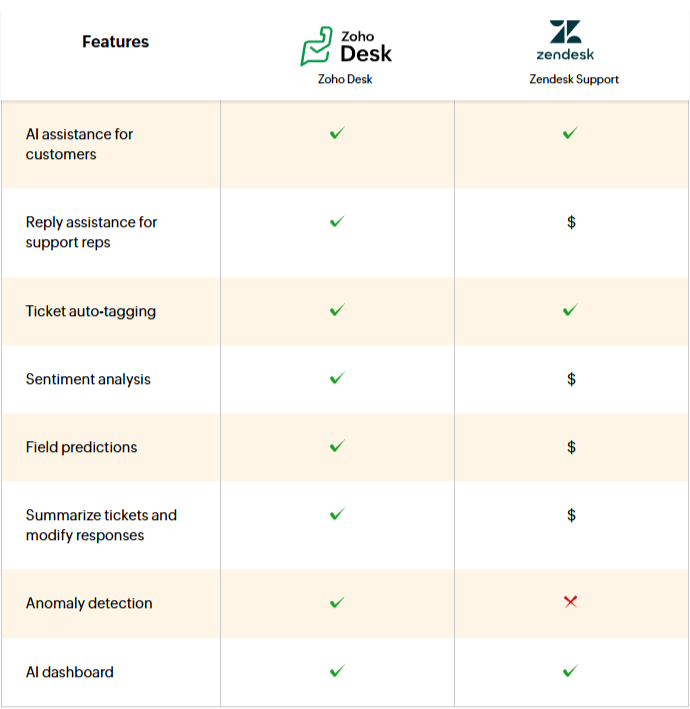
Both Zoho Desk and Zendesk enable you to provide helpful answers to customers instantly, 24/7. Both solutions also offer AI features directly within agents' workspaces, helping them get the context and support needed to quickly prepare valuable responses.
Zoho Desk offers AI features for support teams natively, while Zendesk not only charges extra for them but also uses a complicated pricing structure. AI for customers is limited to a specific number of conversations, after which an additional fee is charged for each conversation, while AI for service teams is available as an add-on.
Omnichannel support
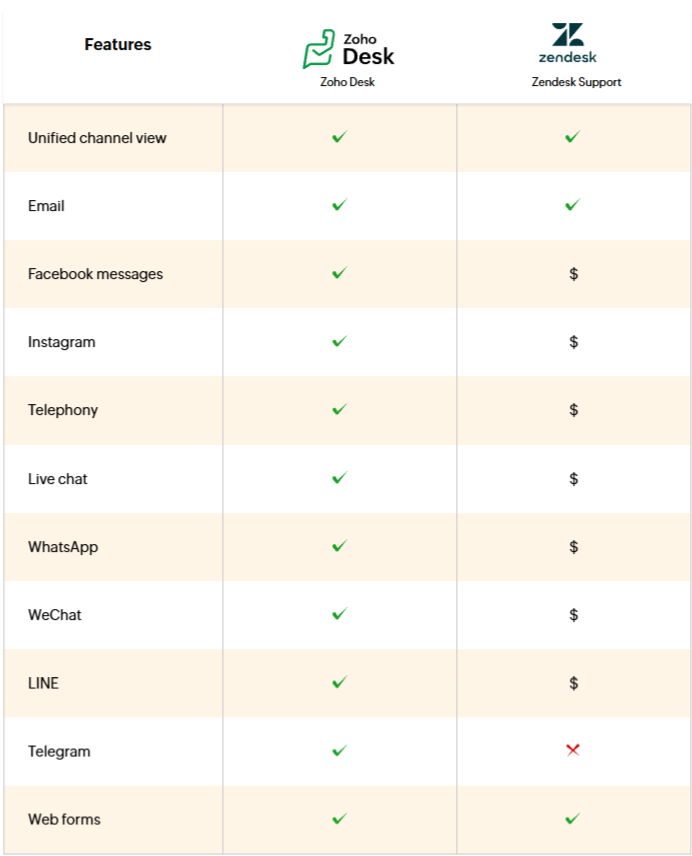
As a company, you either serve customers through specific channels or you're looking for ways to expand your presence to additional channels. Both Zoho Desk and Zendesk can help you with this.
Zoho Desk consolidates interactions from all channels in one place, enabling your team to provide personalized service instantly. Zoho Desk offers all channels natively as part of the license fee, while Zendesk Support provides them as an add-on. It's worth noting that with Zendesk, you pay not only for the license but also for add-ons and potential fees related to specific channels, which can significantly increase customer service costs.
Productivity-boosting features
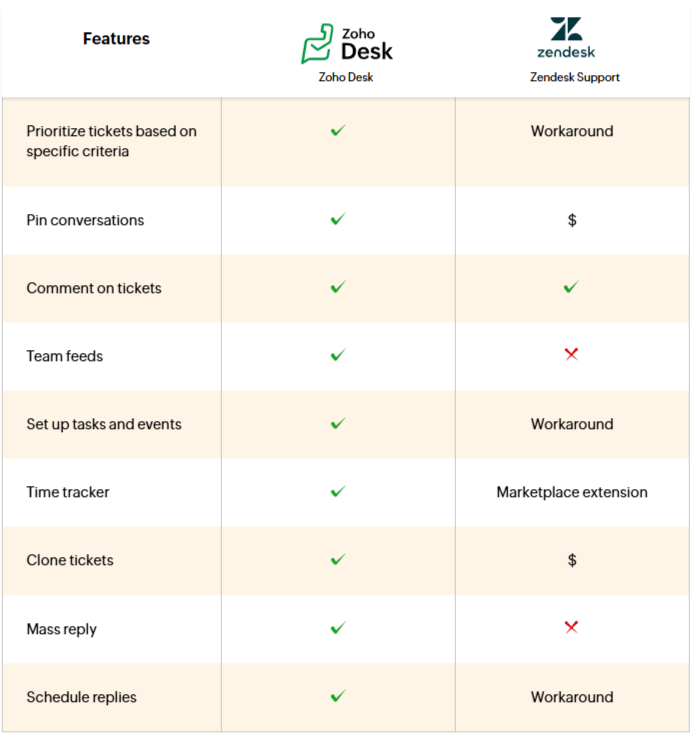
Whether it's prioritizing tickets by specific criteria, pinning important conversations, or creating tasks for quick follow-ups, Zoho Desk empowers support teams by providing these features natively—exactly where they're needed. It also facilitates collaboration, allowing users to share tickets, add comments, or share views in team channels. You can also enable time tracking for each ticket and review tickets assigned to a specific agent or team, which streamlines service management.
With Zendesk, the administrative team often has to find workarounds or incur additional costs to achieve similar results—for example, manually creating views for ticket categorization, opening separate tickets to schedule reminders, or purchasing an add-on for pinning conversations. When planning responses, consultants must use the default configuration set by the administrator, which limits the support team's autonomy and increases reliance on administrators.
Automate repetitive tasks
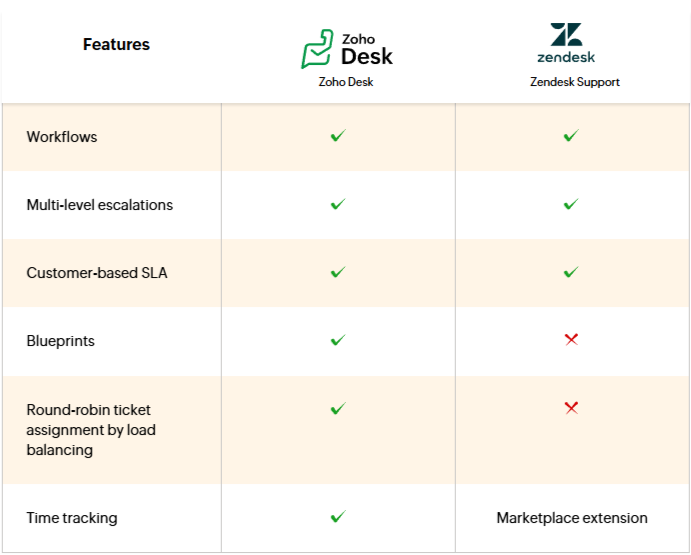
Both Zoho Desk and Zendesk offer automation features like SLAs and Workflows. Zendesk has an automatic assignment feature that allows unassigned tickets to be allocated to agents working on them. However, it does not offer automatic, even distribution of new tickets. The time tracking feature is available as a marketplace extension but has limited capabilities—you cannot automatically track time spent on activities or set billing preferences.
Blueprint, a feature unique to Zoho Desk, helps agents better understand process flows, enabling them to execute them smoothly and without obstacles.
Help customers help themselves
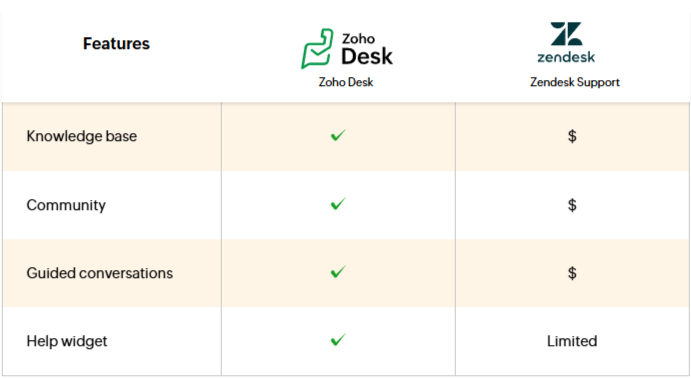
Zoho Desk offers many ways to help customers find answers independently. You can create a help center with a knowledge base and community, allowing customers to find answers themselves or benefit from other users' help. You can also provide them with step-by-step support by building a chatbot flow, implementing an AI assistant, or embedding the help center and chat flows directly into a widget available on your website, mobile app, and help center.
Zendesk limits these capabilities, offering basic self-service features—such as step-by-step chatbots or AI support—as add-ons.
Customize the system to your needs
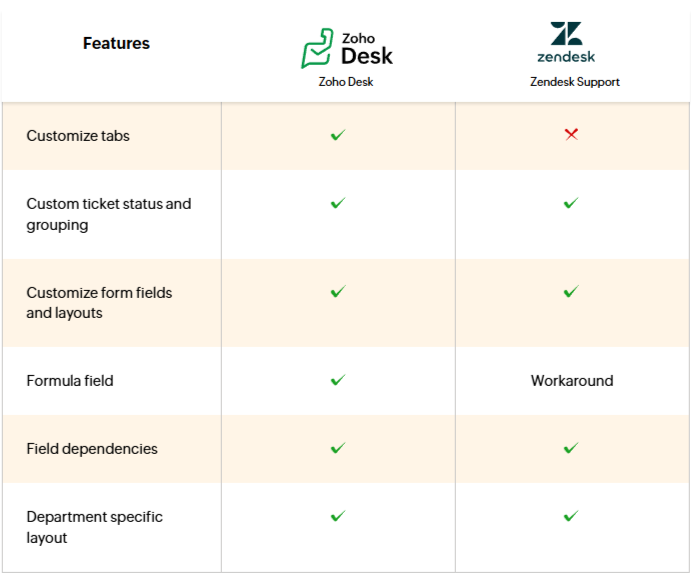
Both applications offer many customization options, such as custom fields and layouts, domain mapping, and multi-language support. Zoho Desk has a slight advantage here because it allows for writing custom functions. This gives you the ability to define how Zoho applications communicate with each other using simple code.
Summary
Zendesk is a comprehensive and popular customer service tool that can be effective for organizations prepared for greater configuration complexity and additional costs associated with extensions. In practice, many key features, such as AI, support for selected channels, chatbots, knowledge base, community, or more advanced self-service capabilities, may require purchasing add-ons or higher-tier packages. This makes the total cost of the system harder to predict, and platform management often demands greater administrator involvement.
Zoho Desk offers a more complete and transparent solution for companies that want to quickly launch professional multi-channel customer service, utilize automation, AI, reporting, and productivity-enhancing tools without the need for continuous system expansion with additional components. For organizations seeking simpler implementation, predictable costs, and full integration with the Zoho business ecosystem, Zoho Desk can be a more effective choice than Zendesk.
If you want to implement Zoho Desk with a trusted partner, contact us. Link below.