
Creatio CRM and Zoho CRM are both feature-rich, advanced CRM platforms available for your organization. Not sure which one to choose? This article provides a detailed comparison of capabilities to help you make an informed business decision.
Creatio focuses strongly on business process management (BPM) and offers a wide range of features for organizations. However, many key capabilities require additional modules or extensions. As a result, the total cost and system complexity can increase along with your business needs.
Details below.
What Zoho CRM can do for your business
%20(1200%20x%20300%20px)%20(2).avif)
✔ Simplified user experience with Canvas
✔ Enterprise-grade security and compliance
✔ End-to-end implementation support
✔ An ecosystem of dozens of integrated business applications
✔ No hidden costs. No long-term contracts
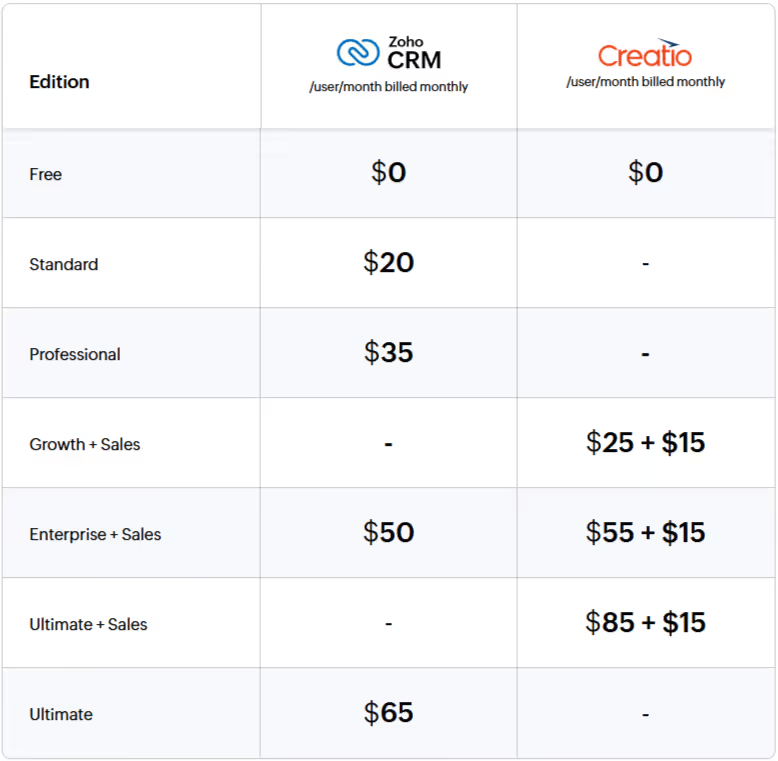
Cost comparison
Features comparison
Lead and deal management
Creatio provides core functionality for capturing, qualifying, and nurturing leads. Users can import leads from files, update multiple records simultaneously, create leads manually, and track stage history via the History tab in Creatio Sales.
However, key capabilities such as lead scoring and web-to-lead/contact forms are only available through the additional Creatio Marketing module.

Omnichannel communication
Creatio Sales allows integration with telephony systems (PBX), enabling users to make and receive calls directly within the CRM. Email accounts can also be integrated to send templates and link conversations with CRM records such as leads and contacts.
Social media integrations allow communication via channels like Facebook Messenger, WhatsApp, or Telegram.
However:
- Creatio does not offer native live chat functionality on websites
- Social media management is not fully native
- There are no real-time notifications when a customer opens an email or responds via chat
Zoho CRM, on the other hand, integrates with SalesIQ for live chat and visitor tracking, and offers native social media engagement, monitoring, and analytics directly within the syste

Process management and automation
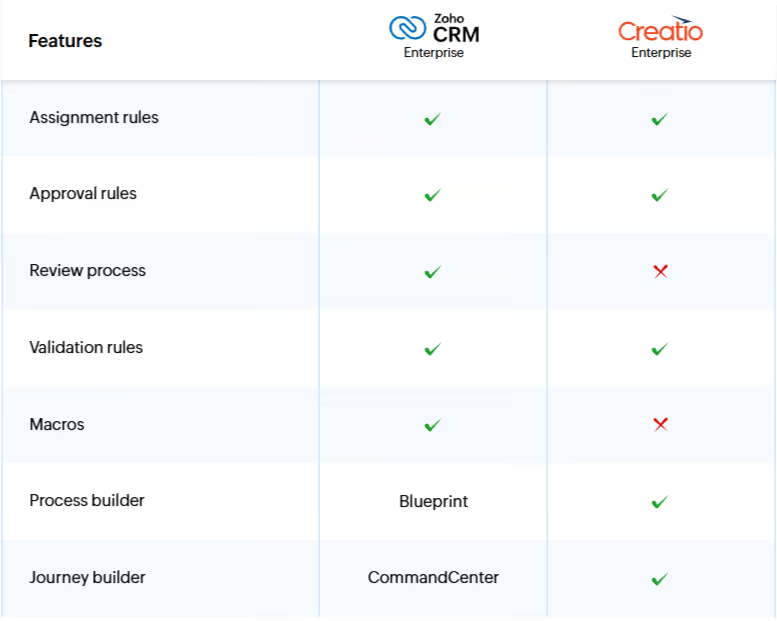
Creatio uses process-driven automation to handle repetitive sales activities such as sending alerts, assigning tasks, and updating fields based on conditions.
However, managing all automation within a single process framework (including workflows, schedules, assignment rules, escalation rules, etc.) can quickly become complex—especially in organizations with multiple departments and sales processes.
Creatio Studio Free enables users to design processes using a visual BPMN 2.0-based editor. Teams can collaborate on process design, use templates, and export diagrams to external BPM systems.
Customization
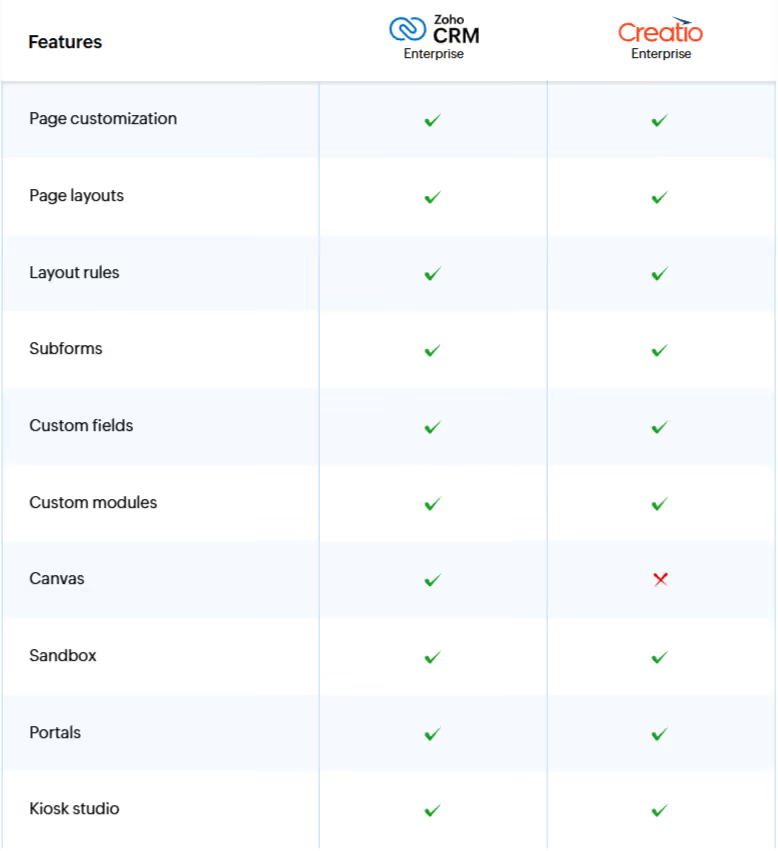
Creatio offers a low-code interface editor across its sales, service, and marketing applications. Users can:
- Modify forms and dashboards
- Control field visibility and behavior
- Configure dynamic field dependencies
- Extend modules with new objects, tabs, and logic
This provides strong flexibility, especially for process-heavy organizations.
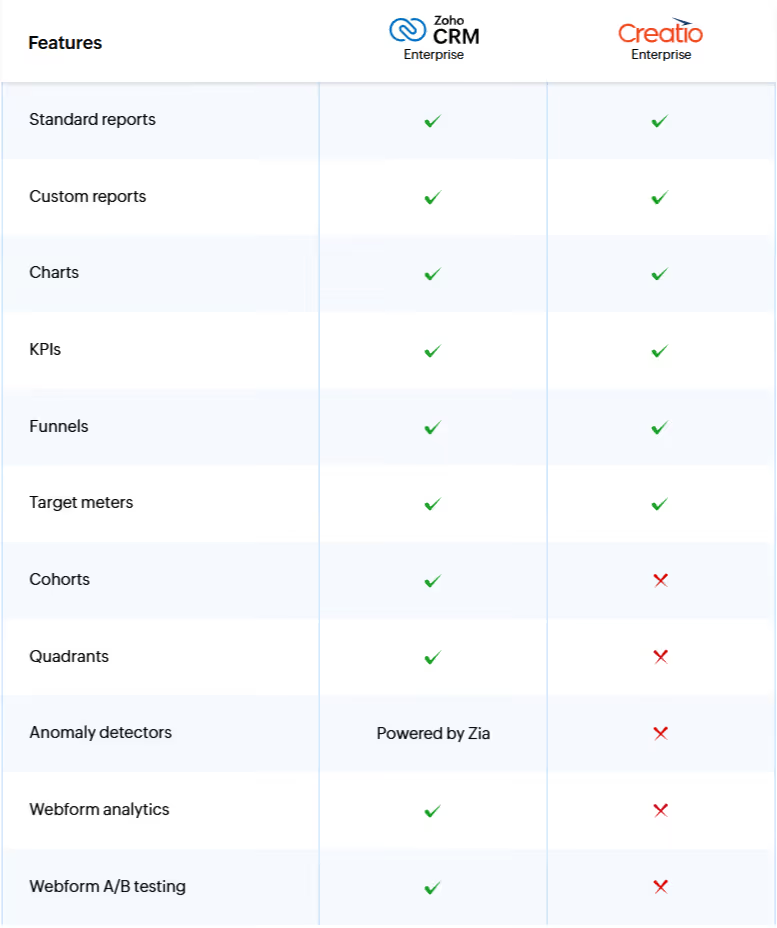
Analytics and reporting
Creatio includes a variety of dashboard components such as line, bar, pie, and pipeline charts. Users can build custom dashboards tailored to their needs.
However, there are limitations:
- No anomaly detection or cohort analysis
- No intuitive step-by-step report builder
- Limited ability to preview or edit reports dynamically
- No automated email delivery of reports
Sales intelligence
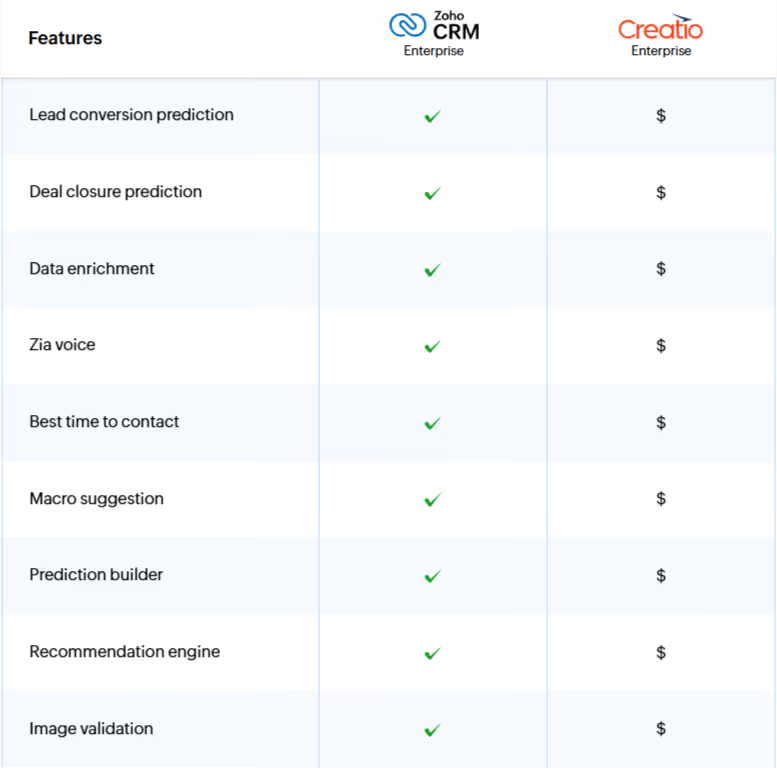
Creatio offers predictive analytics capabilities, including:
- Predictive scoring
- Forecasting
- Recommendations
- Text similarity analysis
These features can support decision-making such as estimating deal success probability or recommending products.
However, these capabilities are only available within the Studio Enterprise plan (additional cost of $25/user/month).
A notable gap is the lack of a conversational AI assistant comparable to Zoho’s Zia.
Sales enablement
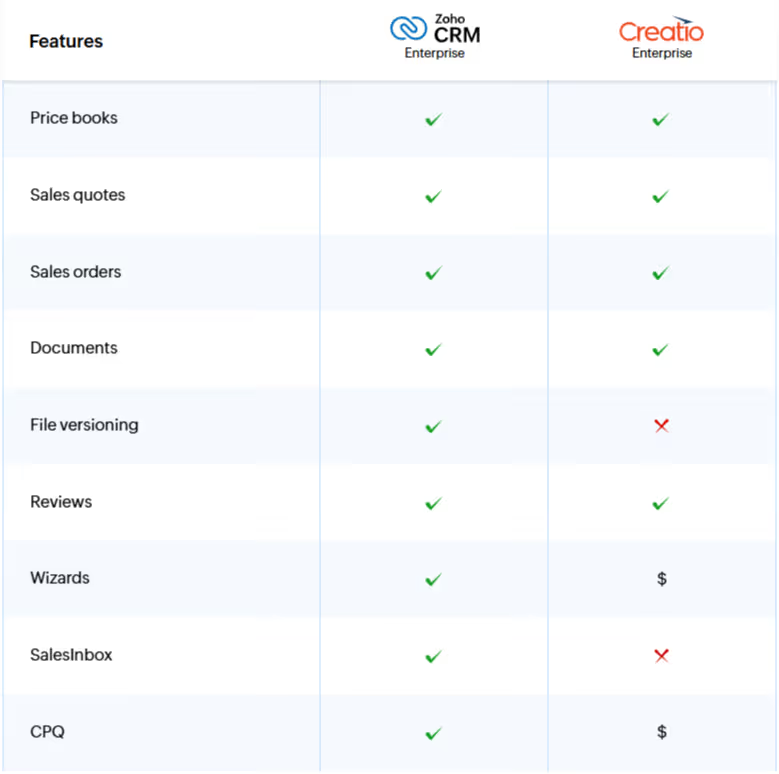
Creatio Sales Cloud provides tools to support sales teams, including document management, attachments, and activity tracking.
More advanced features such as price books, quotes, and orders are only available in the Enterprise edition.
In Zoho CRM, these features are available starting from the Professional edition.
Additionally, guided selling tools (wizards) are not available out-of-the-box in Creatio and require custom process design.
Marketing automation
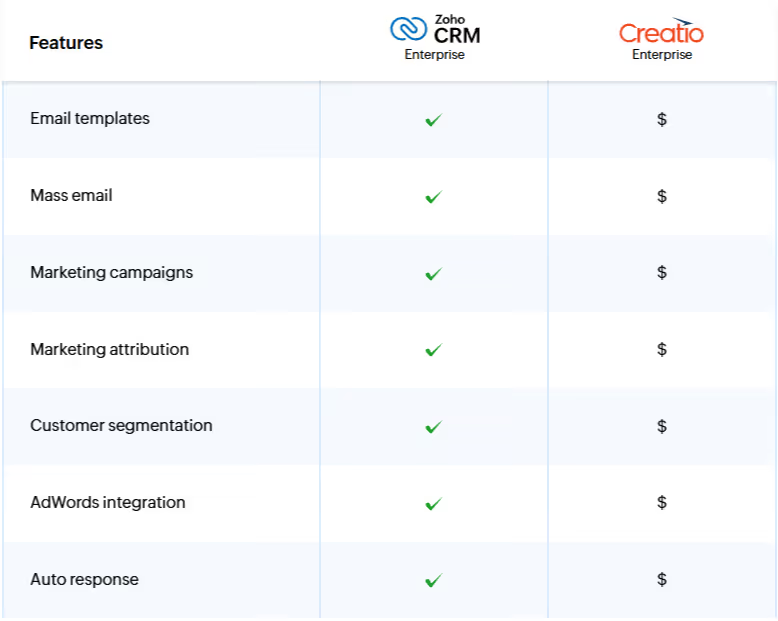
Creatio Sales does not include built-in marketing automation.
Key features such as:
- Lead nurturing campaigns
- Website visitor tracking
- Email and survey analytics
are only available through Creatio Marketing, starting at $1042 per user annually.
In contrast, Zoho CRM includes integrations such as Google Ads, enabling organizations to connect sales outcomes with marketing spend and identify high-performing keywords.
This functionality is not available natively in Creatio Sales.
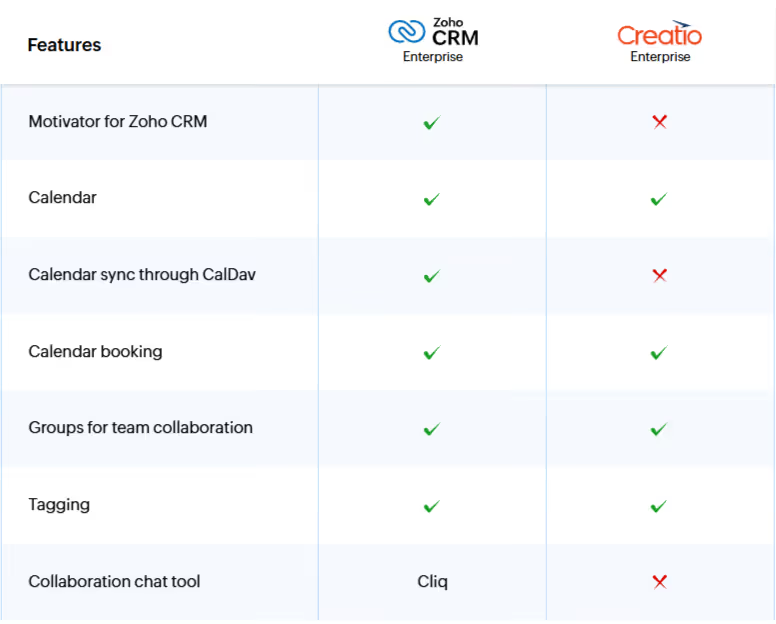
Team collaboration
Creatio offers collaboration tools such as:
- Internal messaging
- Activity feeds
- Task and calendar management
Users can sync calendars with Google Calendar and Microsoft Exchange.
Basic project management features are also included, allowing teams to track timelines, costs, and workload.
The Creatio Marketplace includes integrations with Zoom, Microsoft Teams, Telegram, WhatsApp, and Facebook Messenger.
However, Creatio lacks built-in sales gamification features. Unlike Zoho CRM (with Motivator), it does not provide tools for setting KPIs, running competitions, or visualizing performance in real time.
Summary
Creatio offers strong capabilities in business process management and can be a good fit for organizations heavily focused on BPM.
However:
- Many critical features require additional modules
- Total cost increases with scale
- System complexity grows with process expansion
For companies looking for a more complete, integrated, and ready-to-use CRM platform without the need for multiple add-ons, Zoho CRM is often the more effective and scalable choice.