
HubSpot and Zoho CRM are two feature-rich, advanced CRM systems available for your business. Not sure which one is the better fit? This article provides a detailed comparison of their capabilities to help you make the right decision.
HubSpot Sales Hub can be a good CRM choice for early-stage small businesses. That is because it includes a range of core functions that SMEs may need, especially if they are not yet ready to invest in separate tools for every process. For example, HubSpot offers live chat, email marketing, and calling features. However, companies grow quickly and start needing enterprise-grade functionality — and that is where HubSpot often falls short. Details below.
What Zoho CRM can do for your business
%20(1200%20x%20300%20px)%20(2).avif)
✔ A more streamlined user experience with Canvas
✔ Full security and compliance
✔ Comprehensive implementation support
✔ An ecosystem of dozens of integrated business applications
✔ No hidden costs. No contracts
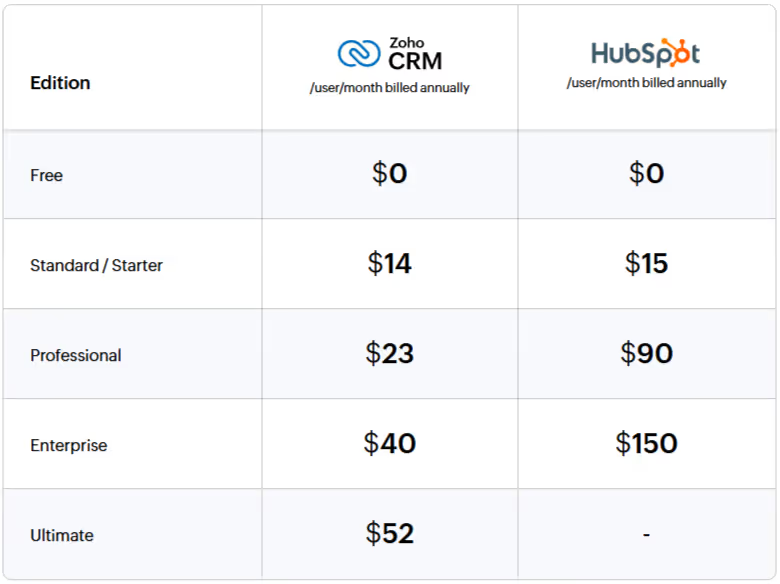
Cost comparison
Feature comparison
When choosing an enterprise CRM, you need to make sure it not only manages sales effectively, but also offers functionality such as AI, customer journey orchestration, and advanced analytics.
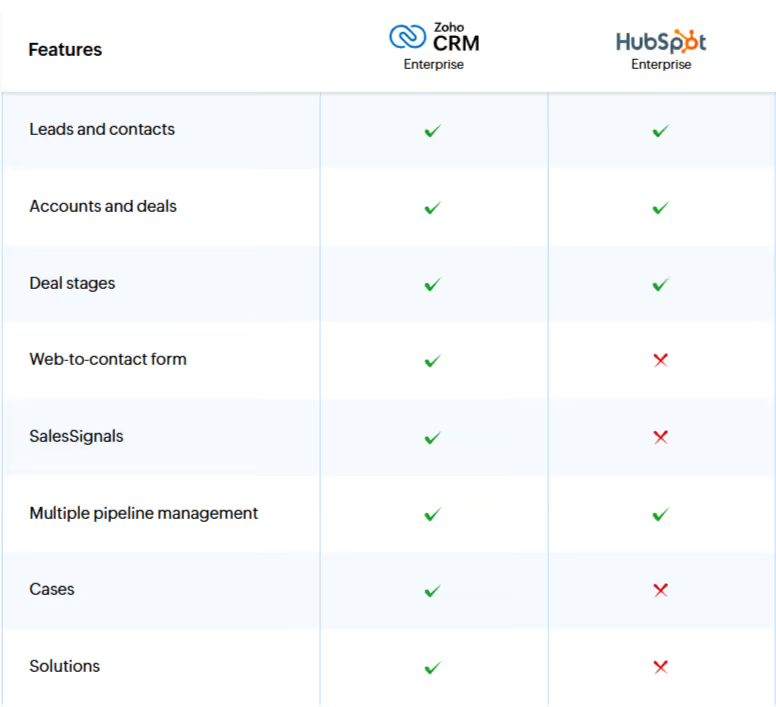
Lead and opportunity management
HubSpot’s lead management functionality provides basic tools for capturing, qualifying, and nurturing leads. The HubSpot mobile app for iOS and Android includes features such as business card scanning and caller ID. Lead scoring is only available from the Professional edition upward, while Zoho CRM offers it already in the Standard edition. It is also possible to import leads from CSV files and map them to the appropriate fields in the system.
One important feature missing in HubSpot is a Kanban view for sales opportunities, which makes it harder to visualize deal stages in the pipeline. AI-based automatic lead assignment is available as a paid add-on under Breeze UI for an extra USD 30, while Zoho CRM includes this capability at no additional cost from the Enterprise edition upward.
Omnichannel support
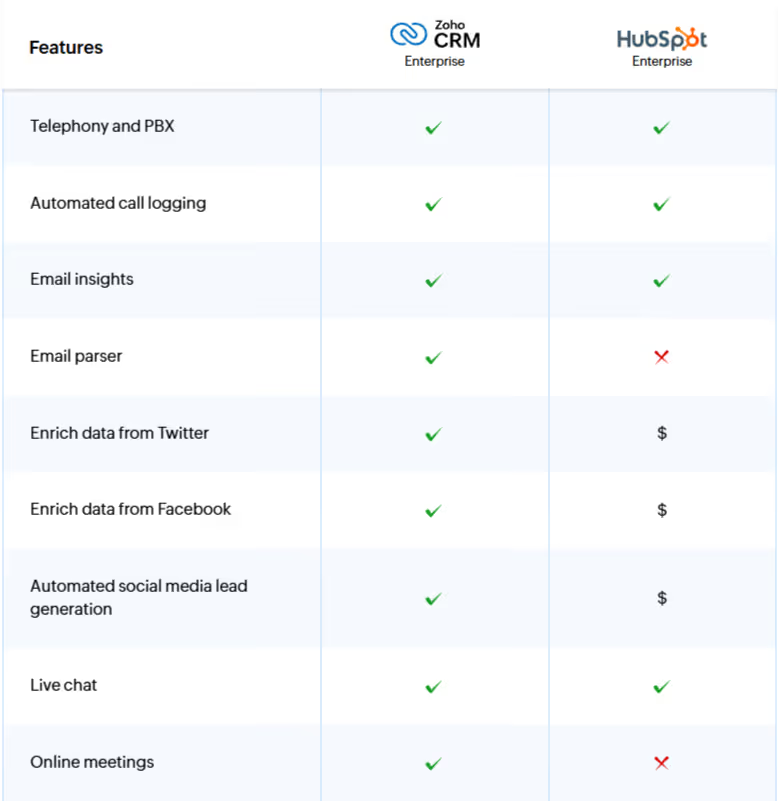
HubSpot Sales Hub integrates with Outlook and Gmail, allowing sales reps to reply to emails directly from within the CRM. With Conversations Inbox, team email addresses can be connected to a shared inbox and incoming emails can automatically be converted into tickets. Live Chat is available in all editions and enables one-to-one conversations with website visitors.
However, if you need integration with Facebook, LinkedIn, or Twitter for post scheduling and publishing, mention monitoring, and performance analysis, you need to purchase the Professional edition of Marketing Hub separately. Email parser functionality, which enables automatic extraction of data from customer emails, is not available in any edition.
Process management and automation
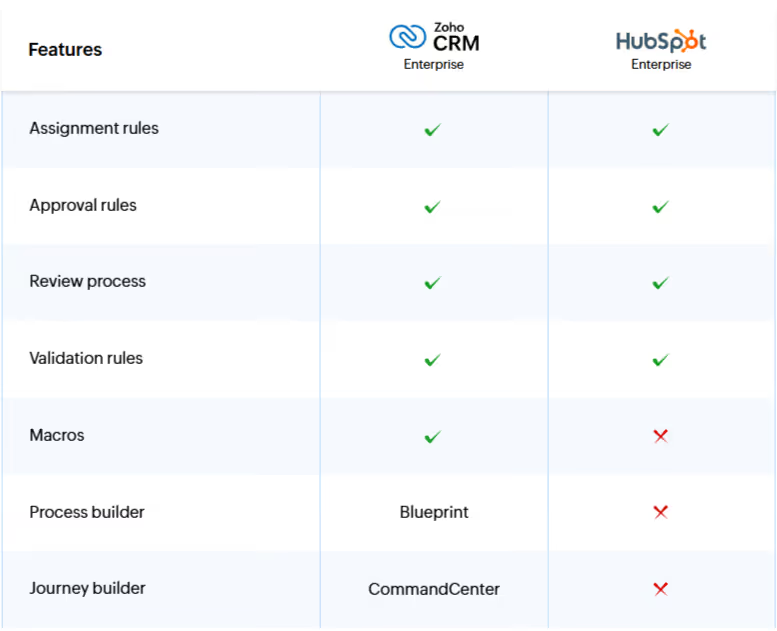
Workflow rules in HubSpot Sales Hub can be used to automatically send email notifications, assign tasks, and update fields after predefined conditions are met.
However, HubSpot Sales Hub does not provide process management functionality at the level needed to build comprehensive, end-to-end sales processes. This is a major gap for enterprise use cases.
Customization
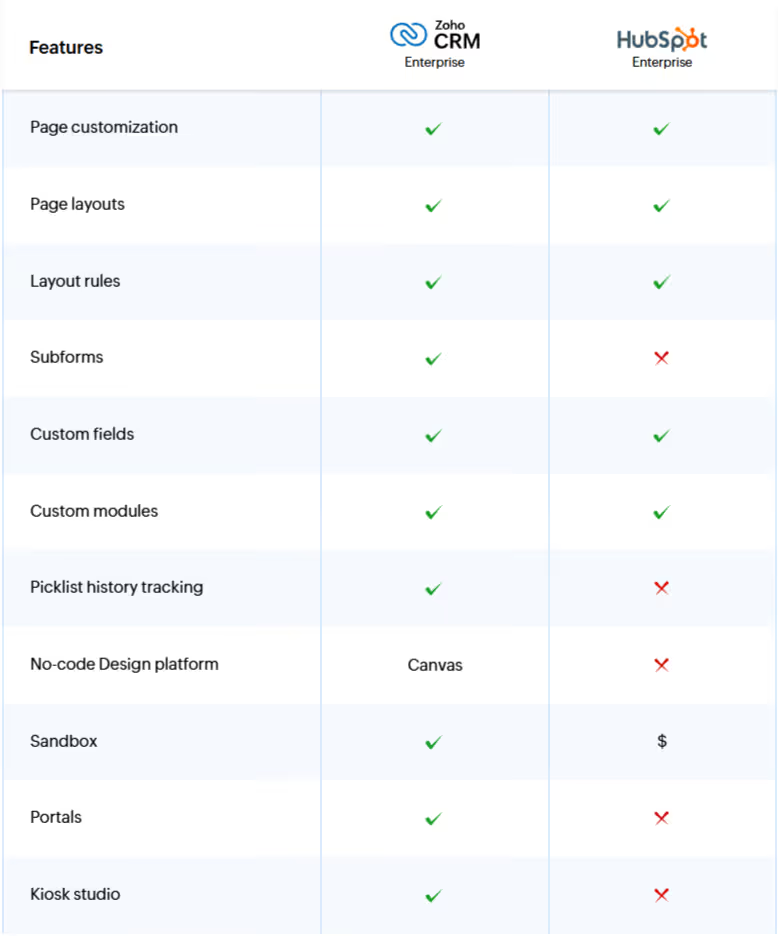
HubSpot Sales Hub offers limited customization compared to Zoho CRM. For example, there is no option to create custom buttons that would let sales reps perform dedicated actions with a single click. Even basic features such as tab grouping or tracking picklist field history are not available in Sales Hub.
Sales Hub also performs weakly when it comes to custom modules. This functionality is only available in the Enterprise edition, with a limit of 10 modules and restrictions on the number of records that can be associated with them.
Analytics and reporting
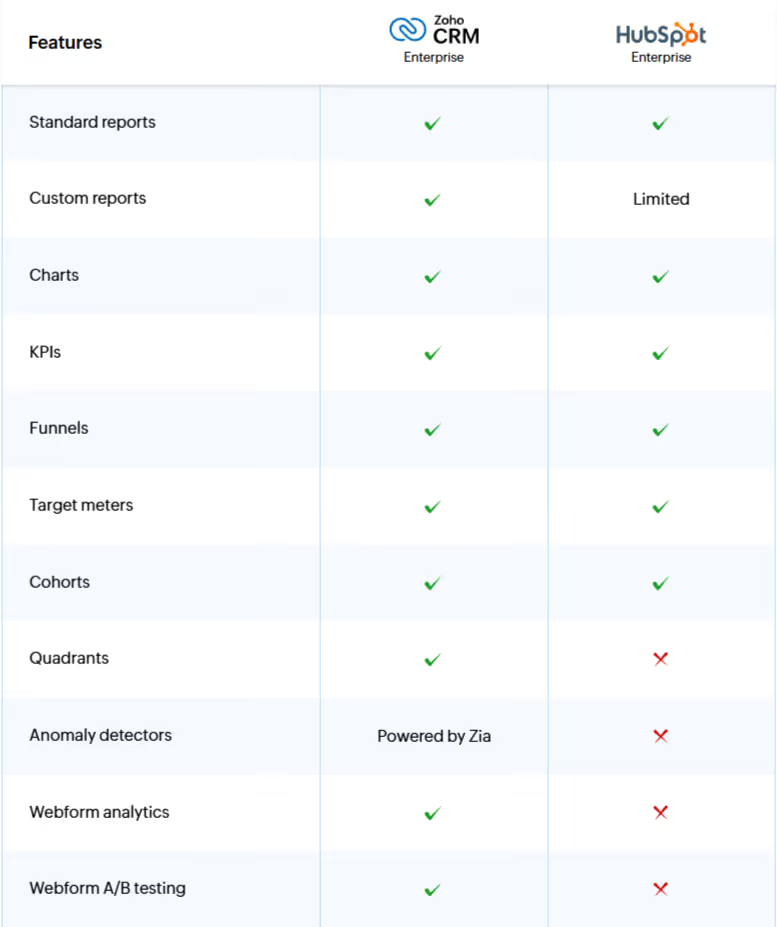
HubSpot Sales Hub offers standard sales reports and dashboards to monitor the sales process. However, a major limitation is the lack of extensive customization.
Custom reports and dashboards are only available in the Professional and Enterprise editions, and the report builder is less intuitive than the one offered in Zoho CRM.
AI for sales
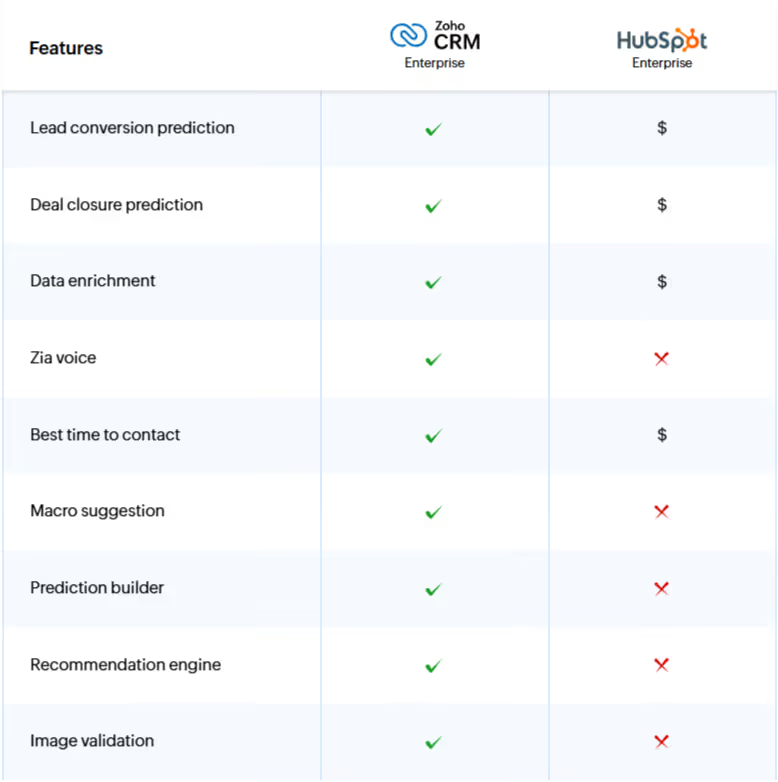
HubSpot’s AI includes buyer intent detection, form shortening, data enrichment, and Breeze Copilot agents as part of Breeze AI. Breeze AI improves sales productivity by providing deal summaries, generating personalized emails, and identifying opportunities matched to a buyer persona.
Although Breeze AI expands HubSpot’s AI capabilities, it is only available as a paid add-on priced at USD 30 per 100 Breeze credits. By contrast, Zia is available as part of the standard Zoho CRM license.
Sales enablement
Sales Hub offers a similar set of sales support features. Quotes and sales order management are available as standard. However, Sales Hub does not support product-based price books. It also lacks advanced features such as SalesInbox in Zoho CRM, which automatically prioritizes and organizes emails according to sales opportunities in the pipeline.
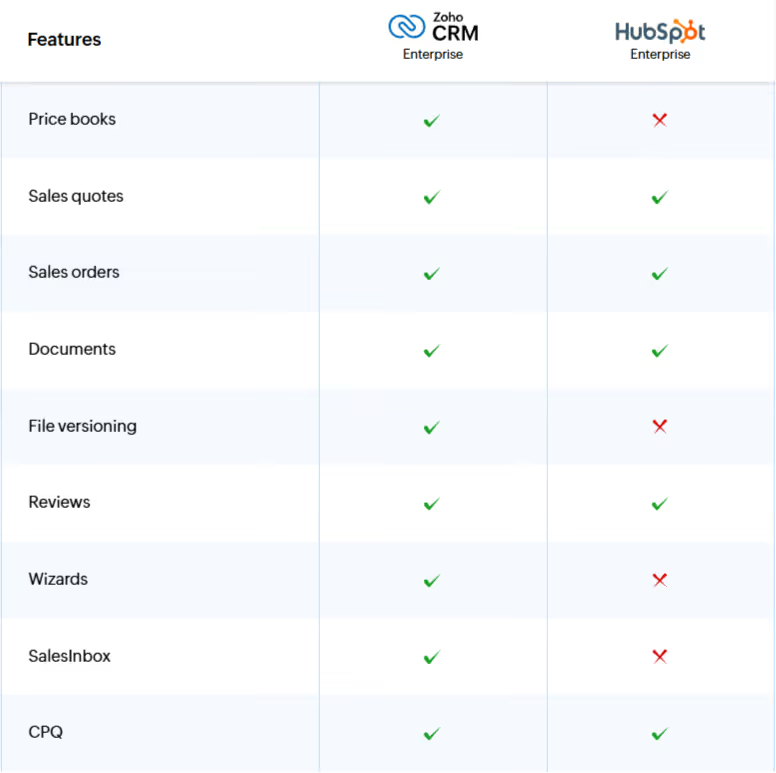
Marketing automation
HubSpot offers only very basic marketing functionality within Sales Hub, such as bulk email sending and email relay options. To access more advanced features such as marketing attribution or campaign management, you need to purchase and integrate Marketing Hub separately.
In addition, it lacks customer segmentation functionality, making it harder to analyze demographics and target specific audience groups precisely.
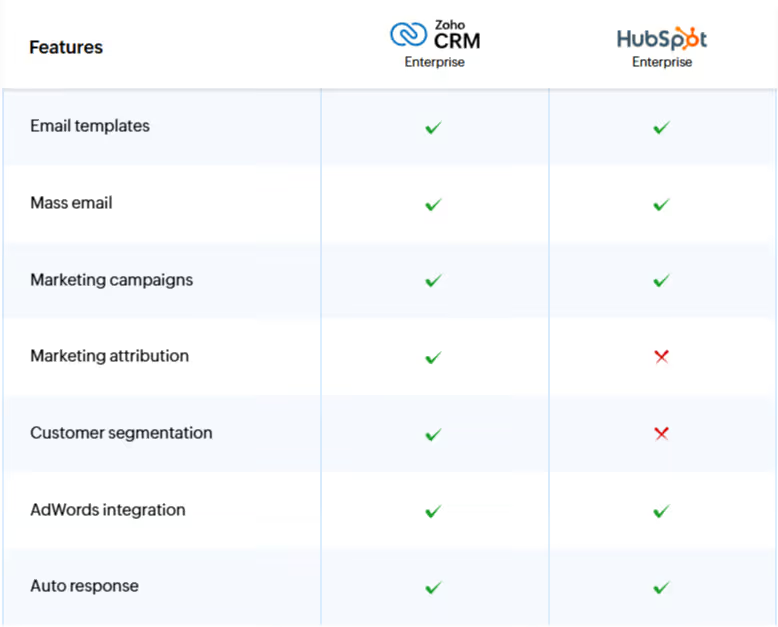
Team collaboration
Compared to Zoho CRM, HubSpot offers a very limited set of collaboration features. Even basic capabilities such as meeting scheduling or calendar synchronization have significant limitations. HubSpot does not include a built-in calendar — users can rely on the Meetings tool to integrate with Google Calendar or Microsoft 365, but there is no full synchronization of meetings and tasks across other devices.
HubSpot also lacks a dedicated team feed for brainstorming or posting updates. Instead, it allows private, contextual conversations within a shared team inbox.
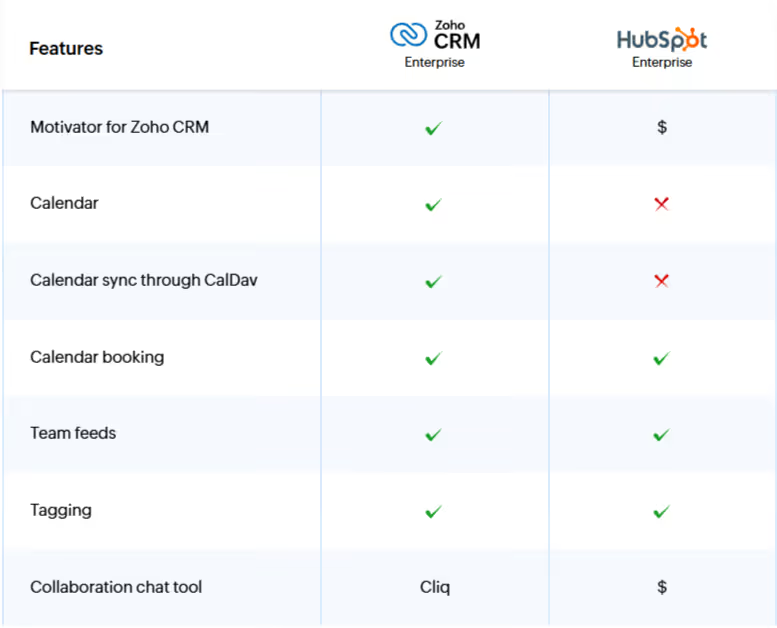
Summary
HubSpot has limited customization capabilities, lacks advanced process automation, in-depth analytics, and stronger developer functionality. While that may not matter to small businesses with limited budgets, these features are critical for larger organizations. Companies thinking long term and planning for growth should consider investing in a scalable solution such as Zoho from the start.
If you want to implement Zoho CRM with a proven partner, contact us.