

Salesforce and Zoho CRM are both advanced, feature-rich CRM systems available for your business. Not sure which one is the right fit? This article provides a detailed comparison of capabilities to help you make an informed decision.
Salesforce was originally designed for large enterprises and only later expanded its offer toward the SMB segment. As a result, the user experience can feel inconsistent - users often need to switch between the legacy interface and Lightning to complete their work. The interface is overloaded and typically requires significant customization, while full system adoption usually depends on a dedicated implementation team.
Details below.
What Zoho CRM can do for your business
%20(1200%20x%20300%20px)%20(2).avif)
✔ Simplified user experience with Canvas
✔ Enterprise-grade security and compliance
✔ End-to-end implementation support
✔ An ecosystem of dozens of integrated business applications
✔ No hidden costs. No long-term contracts
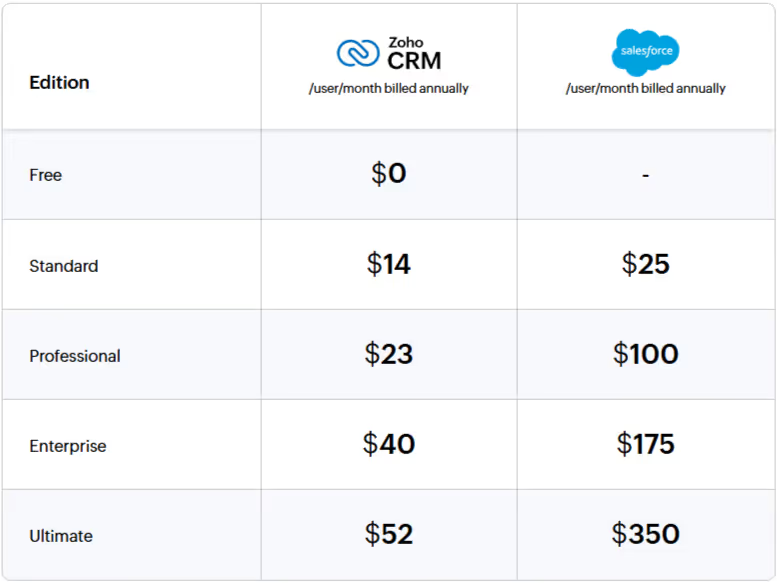
Cost comparison
Feature comparison
When choosing an alternative to Salesforce, you need to make sure it not only preserves the core functionality required for efficient day-to-day sales execution, but also gives your organization access to advanced CRM capabilities such as artificial intelligence, customer journey orchestration, and advanced analytics.
See how Zoho CRM Enterprise and Salesforce Agentforce Sales (formerly Salesforce Sales Cloud) compare side by side across the most important CRM functions.
Lead and deal management
Salesforce’s lead management functionality provides the basic tools needed to capture, qualify, and nurture leads. However, Salesforce lacks some important lead management capabilities — there is no built-in business card scanner, and the web-to-lead feature is fairly basic.
Zoho CRM offers a comprehensive set of tools that help organizations engage, capture, nurture, and convert as many leads as possible. For field sales teams, the Zoho CRM mobile app includes business card scanning, voice-to-text notes, and many other useful capabilities for capturing and tracking lead information on the go.

Omnichannel communication
Salesforce enables users to sync email activity and push information directly into the CRM from their inbox. However, Salesforce Agentforce Sales does not include native live chat functionality and requires Agentforce Service as an additional purchase. Salesforce also does not provide a native way to respond to social media posts, monitor customer activity across social channels, or manage social accounts directly within the CRM.
Zoho CRM delivers omnichannel communication as a native part of the sales process, combining email, telephony, live chat, messaging apps, and social interactions in a single interface. Conversations are automatically linked to CRM records, giving sales teams full context across all channels. By embedding omnichannel capabilities directly inside the CRM, Zoho reduces tool fragmentation and enables faster, more consistent customer interactions.

Process management and automation
Salesforce supports process automation through tools such as Flow Builder, approval processes, and automation rules. These capabilities allow organizations to design sophisticated workflows, but they often require careful configuration, testing, and ongoing administration. More advanced use cases - such as enforcing stage progression or building guided sales processes - typically rely on Flows and higher editions, which increases implementation effort and dependency on specialized administrators.
Zoho CRM provides built-in process management and automation through Workflows, Blueprints, Wizards, and Cadences, all designed with sales teams in mind. Organizations can define step-by-step processes, enforce mandatory actions, and automate follow-ups with minimal configuration.

Customization
Salesforce offers customization through record types, page layouts, Flows, Apex, and Lightning components. This provides significant flexibility, but many customizations require advanced configuration or development work, increasing reliance on administrators and developers. As complexity grows, ongoing maintenance and testing also become necessary, making customization powerful but time-consuming and expensive to manage at scale.
Zoho CRM supports customization through a low-code approach using layouts, fields, workflows, Blueprints, Wizards, and client scripts. For more advanced requirements, Zoho also supports custom functions and APIs, allowing teams to extend CRM capabilities while maintaining a simpler and more accessible configuration model.

Analytics and reporting
Salesforce provides reporting and dashboard functionality that is largely report-driven. This offers flexibility, but it also means that most analytical views require reports to be created and configured before they become useful for sales teams. More advanced analytics - such as trend analysis, comparative insights, and predictive views - typically require higher editions and, in many cases, CRM Analytics (Einstein Analytics) or Tableau add-ons.
Zoho CRM delivers analytics that are ready to use for sales teams, with a broad range of built-in dashboards and reports available out of the box. Zoho CRM consolidates lead, deal, activity, campaign, and revenue data into one analytical layer, allowing managers to quickly identify bottlenecks and trends. With AI-driven insights from Zia and built-in BI through Zoho Analytics in the Ultimate edition, teams gain deeper visibility without having to rely on external analytics tools.

Sales intelligence
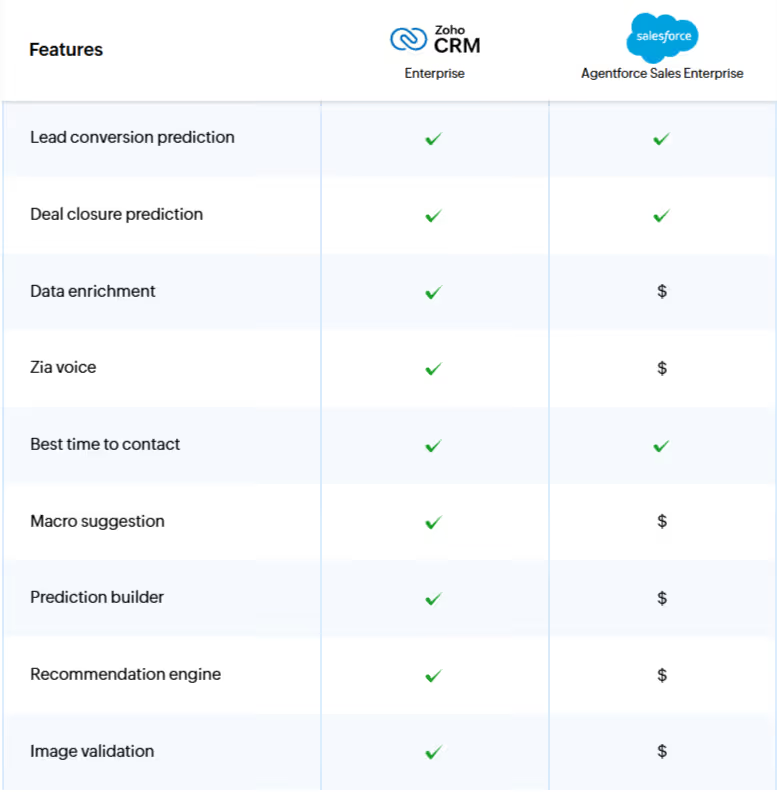
Salesforce Agentforce for Sales is available as a paid add-on and provides agentic AI for autonomous task execution. Core Einstein capabilities included in higher editions offer predictive lead and opportunity scoring as well as forecasting. More advanced agentic functionality, such as autonomous agents and custom prompts, may require additional setup or integration with Data Cloud. Conversation analysis and automated note generation are developed further through a separate Einstein Conversation Insights add-on.
Zoho CRM’s built-in AI assistant, Zia, helps sales teams prioritize the right leads, predict deal outcomes, and act on insights without relying on separate AI products. Zia continuously analyzes CRM data and sales activity to recommend next best actions, flag risks, and detect anomali
Sales enablement
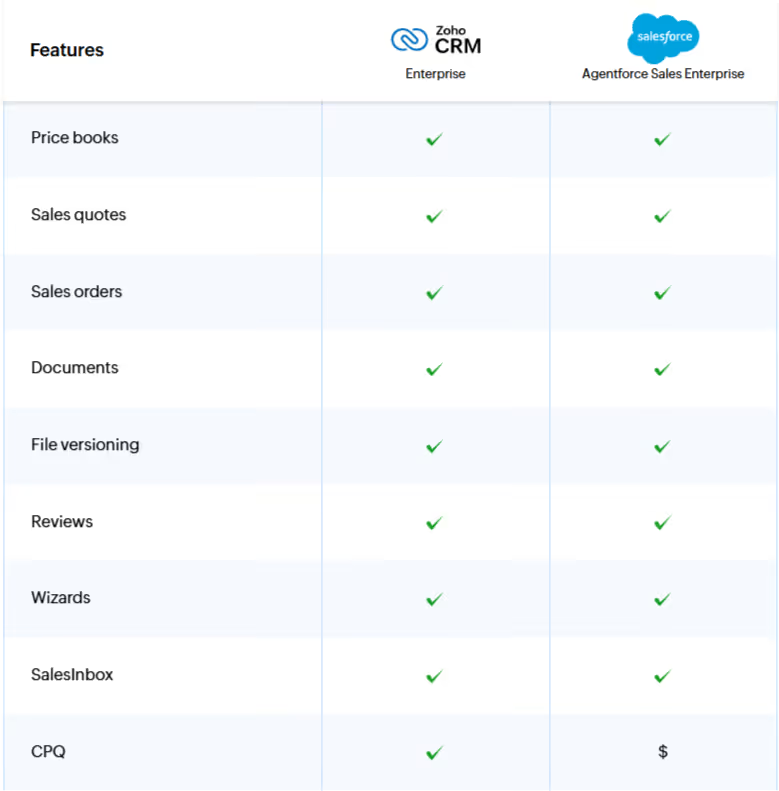
Salesforce provides core sales enablement capabilities such as products, price books, and basic quoting. However, more advanced sales workflows - such as guided selling, complex quote configuration, inventory visibility, and subscription pricing - typically require additional products such as Salesforce CPQ or integrations with external systems. Compared to Zoho’s more unified model, Salesforce sales enablement is powerful, but also more fragmented and more dependent on administrators.
Zoho CRM includes a comprehensive set of built-in sales enablement tools designed to support sales teams throughout the entire sales cycle. From lead capture to deal closure, Zoho provides native capabilities for guided data entry, quoting, order management, and customer access - all within one platform. Thanks to tight integration with the Zoho Finance Suite, sales teams can generate quotes, sales orders, and purchase orders directly from Zoho CRM, while also accessing expense, inventory, and subscription information without leaving the CRM.
Marketing automation
Salesforce Agentforce Sales provides only basic email functionality for one-to-one communication and limited outreach. More advanced marketing automation capabilities - such as bulk campaigns, behavioral segmentation, journey orchestration, attribution modeling, and omnichannel engagement - are not part of the core Sales Cloud offering.
Zoho CRM includes built-in marketing capabilities that allow sales and marketing teams to work from the same data set. Users can run email campaigns, associate leads and contacts with campaigns, segment audiences, and track campaign performance directly inside the CRM. This gives teams a clearer understanding of lead sources, engagement levels, and revenue impact without requiring a separate marketing automation product.

Team collaboration
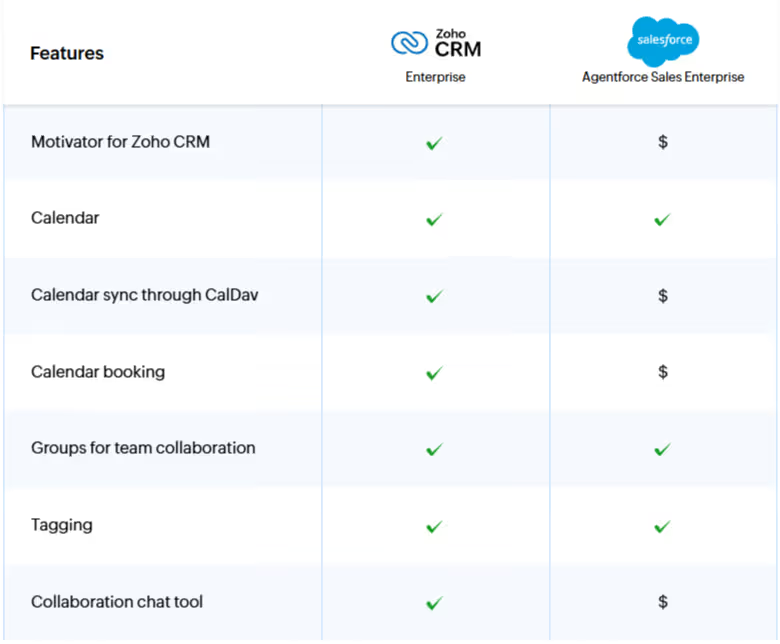
Agentforce Sales includes collaboration features such as Chatter for internal discussions and activity updates. However, many important collaboration workflows depend on integrations with external products through connectors. Scheduling meetings or hosting webinars typically requires tools such as Zoom or Webex and separate licenses. While integrations with platforms like Microsoft Teams exist, they require additional configuration and do not provide the same level of native, CRM-embedded collaboration that Zoho offers.
Zoho CRM was built for native, contextual collaboration between sales, marketing, and delivery teams. Conversations, tasks, meetings, and project updates happen directly within CRM records, giving teams a shared context and real-time visibility without relying on expensive third-party tools.
Summary
Salesforce offers a very broad set of capabilities, but using them effectively often comes with significant complexity, high costs, and the need to involve specialists for implementation and ongoing maintenance. The interface can be unintuitive, and many critical functions require additional modules or integrations, which increases total cost of ownership.
While this may be acceptable for large enterprises with the right resources, for many companies it becomes a meaningful barrier. Organizations focused on efficiency, faster deployment, and lower operating costs should consider a more integrated and accessible solution such as Zoho CRM.
If you are considering implementing Zoho CRM with a proven partner - feel free to contact us via the link below.