
Many Freshdesk customers were disappointed with complex setup processes and the platform's limited ability to handle growing business needs. With this in mind, it's no surprise that many companies are starting to look for alternatives to Freshdesk.
Here's what Zoho Desk offers your business
✔ Seamless integration
✔ Faster implementation
✔ Transparent pricing
✔ Free migration
✔ Simplified onboarding
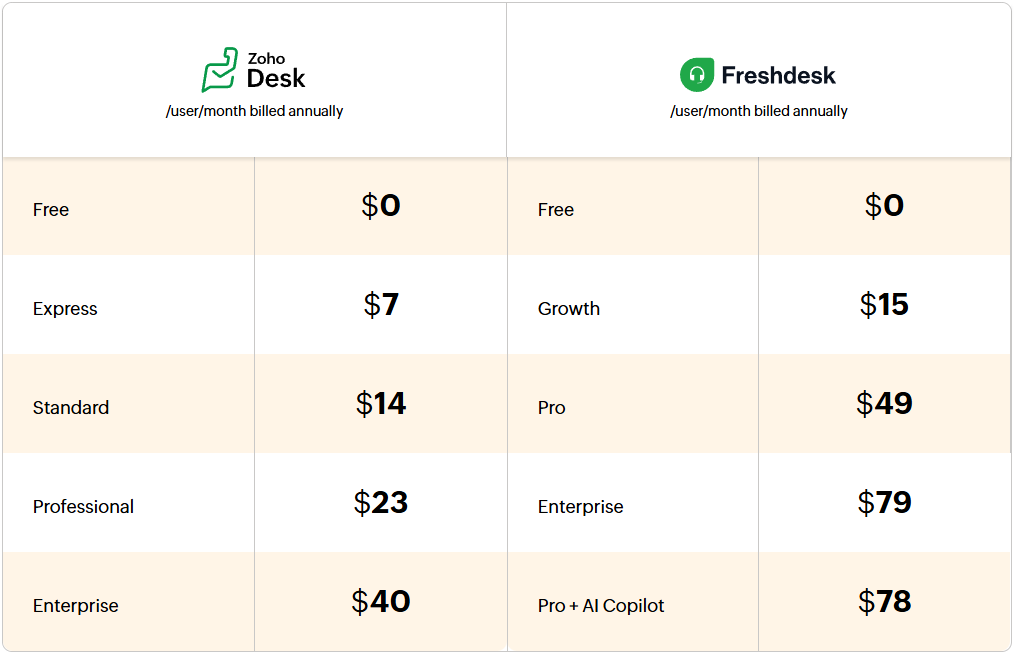
Cost comparison
Feature comparison
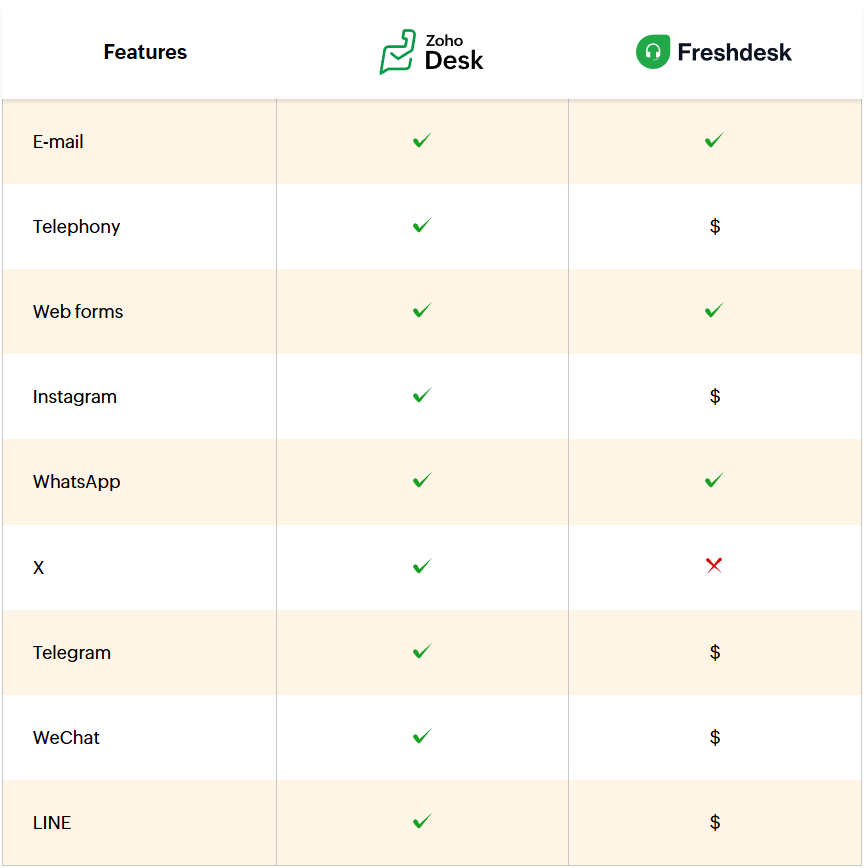
Omnichannel support
Freshdesk allows for centralizing customer interactions from multiple channels in one place. However, to use this functionality for channels like live chat, telephony, or messengers, additional costs are required beyond the standard subscription fee. Freshdesk does not support X as a service channel, which can limit the ability to monitor conversations and support customers through it. For integration with Telegram and WeChat, you have to rely on marketplace extensions.
Agent productivity
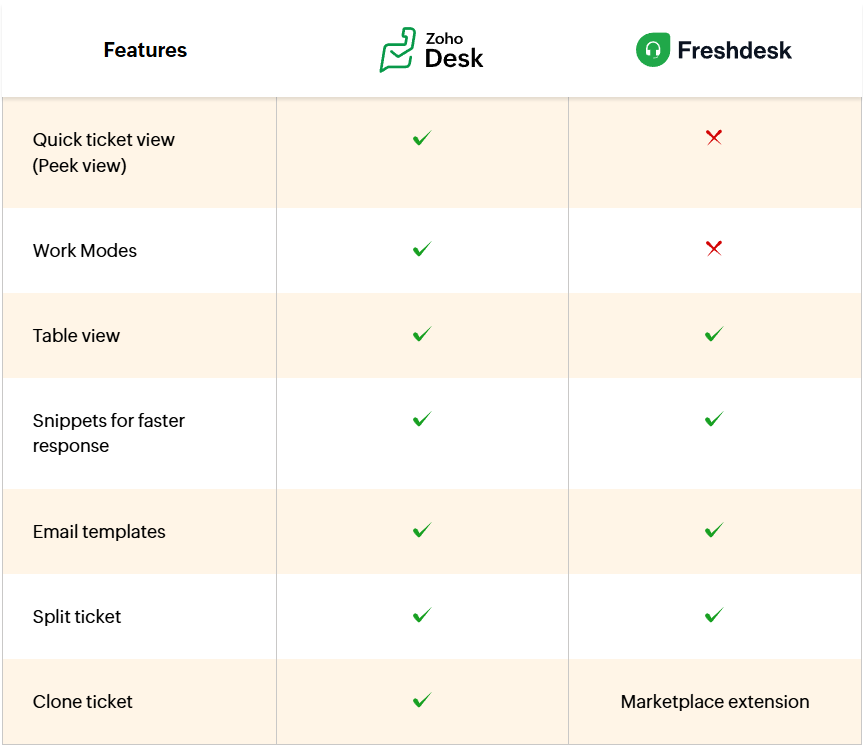
Freshdesk allows agents to manage tickets by creating list views, but it doesn't offer simple and automatic organization of tickets by priority, due date, status, or CRM status. Even the basic ticket cloning feature – useful for creating similar tickets for different customers or for onboarding new employees to existing tickets – is only available as a marketplace extension.
Zoho Desk was designed with agents' needs in mind as a user-friendly solution accessible to everyone – thanks to its new interface, user preferences, and accessibility settings. Agents can organize and view tickets according to their needs using work modes, table view, and customizable filters. Ticket management is simpler because all key features are built directly into Zoho Desk.
Customer Self-Service
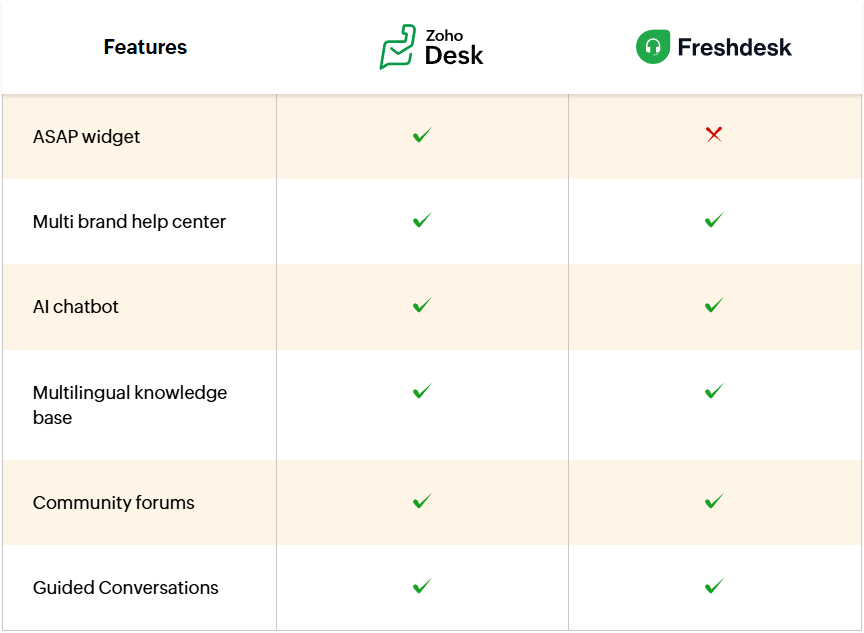
Both applications allow you to create a help center with a knowledge base, community forums, and an AI-powered chatbot that helps customers find answers at their convenience. However, in Freshdesk, only two self-service features can be added to the help widget: a contact form and knowledge base articles. This limits customers' ability to resolve issues independently outside of the help center.
Zoho Desk offers ASAP – a help widget that can be added to your website or help center, allowing customers to get answers in one convenient place. With the ASAP widget, you can provide multiple self-service options, such as a knowledge base, community forums, a contact form, live chat, Guided Conversations, and an AI-powered chatbot. Zoho also makes it easy to further customize the tool to your brand's needs.
AI
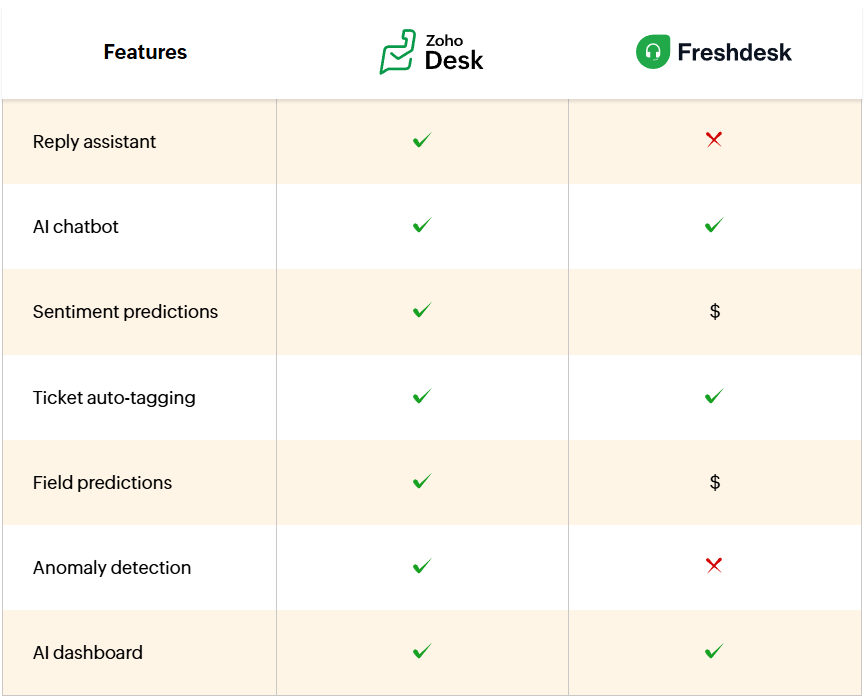
Both applications offer AI features that help deliver personalized customer service faster. In Freshdesk, access to advanced AI-powered features like sentiment prediction, response assistant, or chatbots is only available as add-ons.
Zoho Desk's AI assistant – Zia – addresses the needs of various user groups. Zia provides agents with relevant response suggestions, automatically updates ticket fields to accelerate automation, supports customers by delivering precise answers, and helps maintain smooth service operations through anomaly notifications and by providing crucial customer insights.
Automation
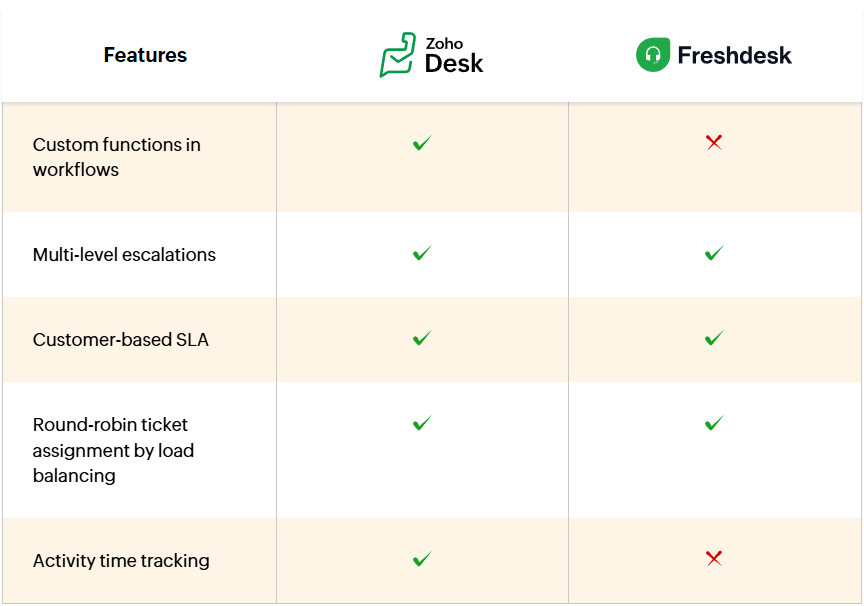
Both Zoho Desk and Freshdesk offer automation features such as round-robin ticket assignment, SLAs, and workflows. However, Zoho Desk goes a step further with advanced process automation – Blueprints. This allows you to design automated workflows and assign tasks and agents to specific stages of a process.
Customization
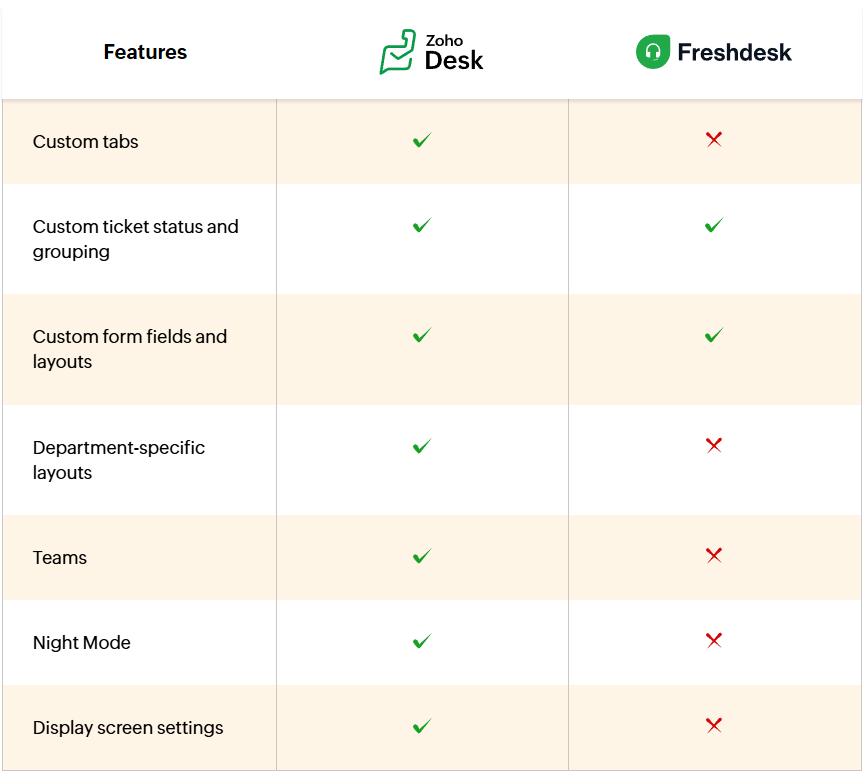
Both applications offer many customization options, such as custom fields and layouts, domain mapping, and multi-language support. In Freshdesk, you can customize the help center, reports, and dashboards, but not the help desk system itself.
Zoho Desk gains an advantage here, as it allows for customization of both the help desk system and the self-service portal. In Zoho Desk, agents can be categorized by departments and teams – instead of generic "groups" as in Freshdesk – and department-specific layouts can be created to collect information in various modules, such as tickets or contacts. This facilitates efficient organization of service operations. Agents can also organize and rename modules in their accounts, switch to night mode, choose font type and size, and set their preferred display layout.
Analytics
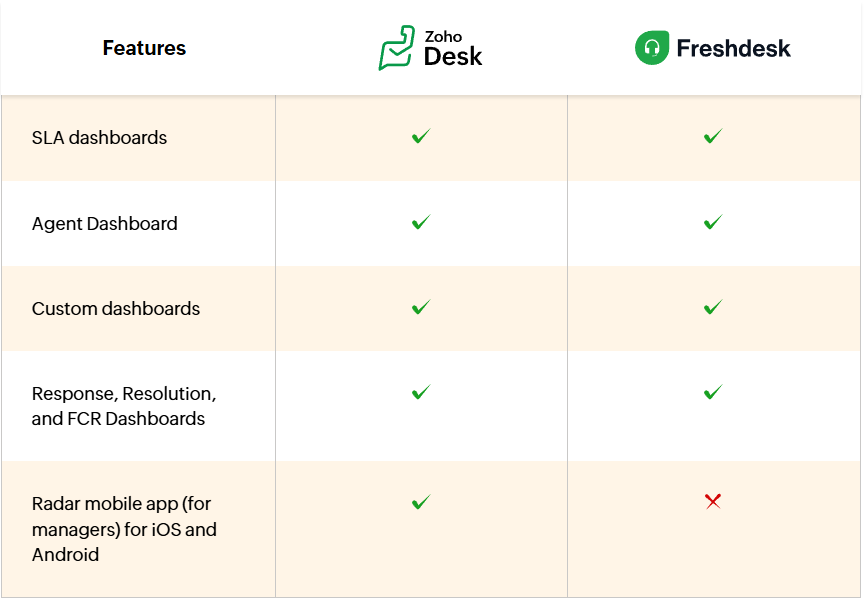
Both applications include many reporting features, but customization options are limited in Freshdesk. In Zoho Desk, you can customize reports and dashboards for all the help desk metrics you want to monitor. In Freshdesk, you can only create 15 custom dashboards. To analyze agent efficiency and ticket flow across all channels, purchasing other plans may be necessary.
Summary
Freshdesk is a popular customer service solution that can work well for companies looking for a basic help desk system with room for future expansion. In practice, however, many important features, such as support for selected channels, advanced AI, chatbots, ticket cloning, messenger integrations, or more extensive analytics, may require additional extensions, higher plans, or purchasing components from the marketplace. This increases the total cost of the system and can hinder scaling customer service as the company grows.
Zoho Desk is a more complete and flexible solution for organizations that want to quickly launch professional multi-channel customer service, utilizing AI, automation, self-service, customization, and reporting without the need for continuous add-on purchases. For companies seeking predictable costs, greater process control, and full integration with the Zoho ecosystem, Zoho Desk can be a more effective alternative to Freshdesk.
If you want to implement Zoho Desk with a trusted partner, contact us. Link below.