
Salesforce Service Cloud has been a popular help desk solution for years, offering a wide range of features. Despite this, many companies are choosing to switch to other platforms. Given the complexity of implementation, daily use, and the costs associated with Service Cloud, seeking an alternative is not surprising.
Here's what Zoho Desk offers your business
✔ Seamless integration
✔ Faster implementation
✔ Transparent pricing
✔ Free migration
✔ Simplified onboarding
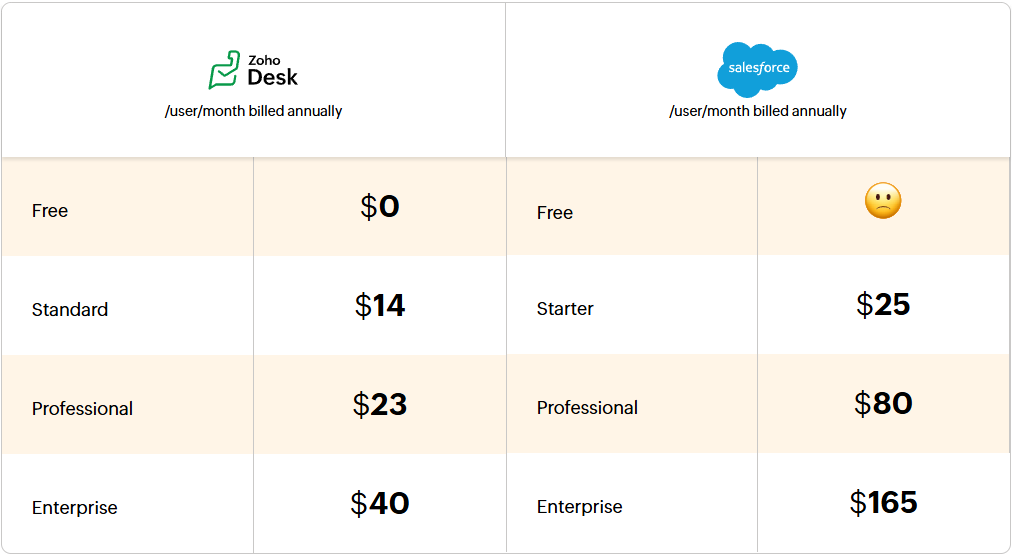
Cost comparison
Feature comparison
Omnichannel support
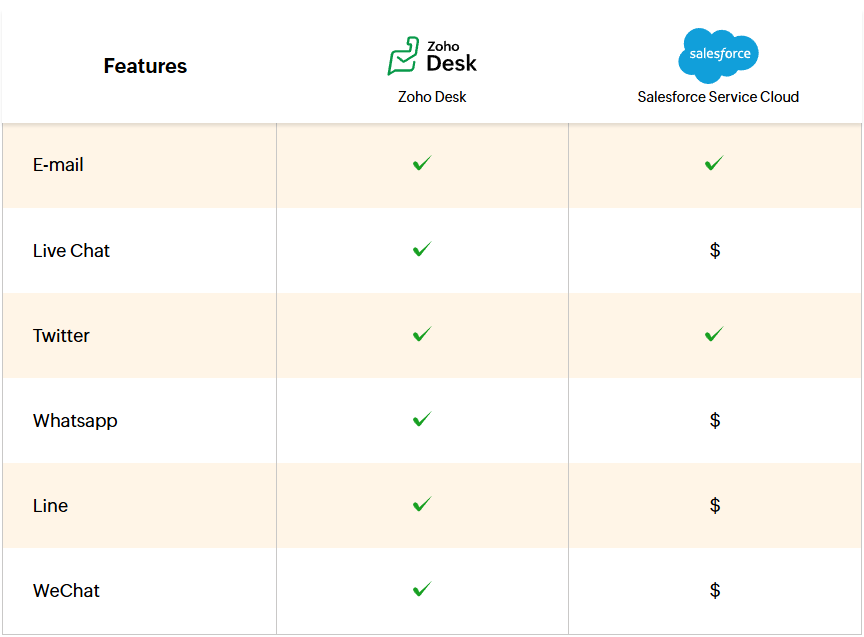
Salesforce Service Cloud offers a limited number of channels through which you can serve customers. To provide support via messaging apps like WhatsApp or Facebook Messenger, purchasing additional extensions is necessary.
Zoho Desk helps provide customers with a complete omnichannel experience through built-in support for email, live chat, telephony, social media, web forms, and messaging apps. You can view interactions from all channels in one place or in dedicated modules for live chat, messaging apps, and social media. This better prepares agents to provide quick and personalized responses.
Agent productivity
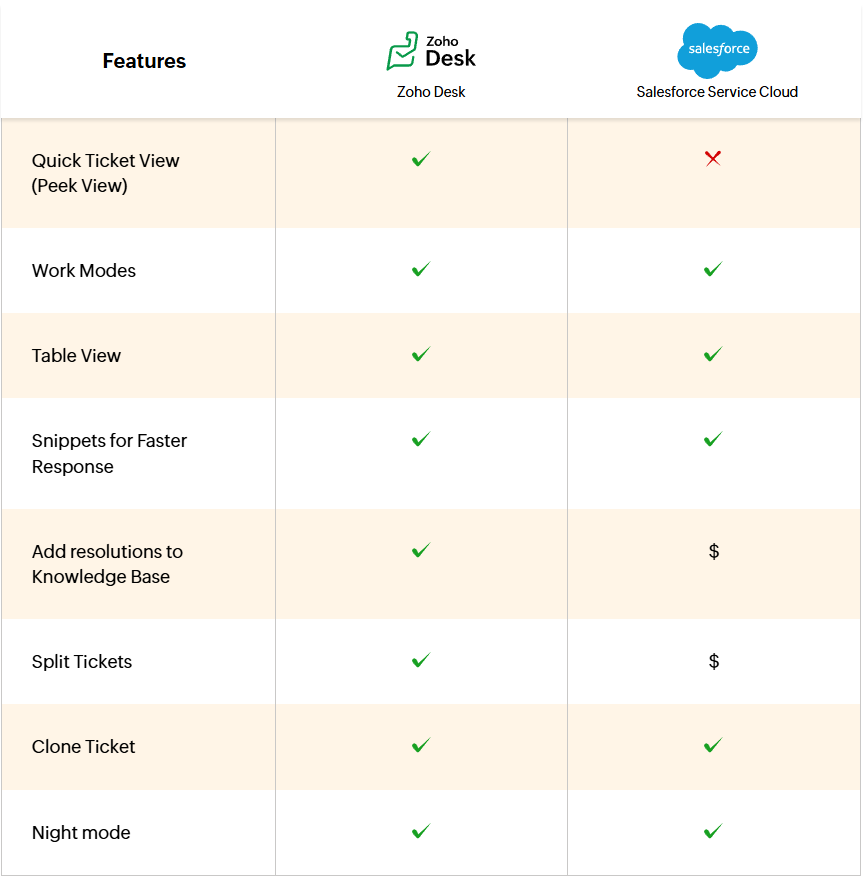
Both Salesforce Service Cloud and Zoho Desk allow agents to view tickets by priority, status, and due date. In both applications, tickets can be displayed in a list, Kanban, or table view. Both systems offer features to increase agent productivity; however, Service Cloud does not provide a native application for remote desktop access or the basic function of splitting tickets.
Zoho Desk offers a built-in remote access application that allows agents to access a customer's screen with a single click. Designed with the needs of support teams in mind, Desk is a user-friendly solution accessible to everyone—thanks to its new interface, user preferences, and accessibility settings. To ensure smooth ticket management, Zoho Desk includes built-in features such as ticket splitting, ticket cloning, adding solutions as knowledge base articles, canned responses, and much more.
Customer Self-Service
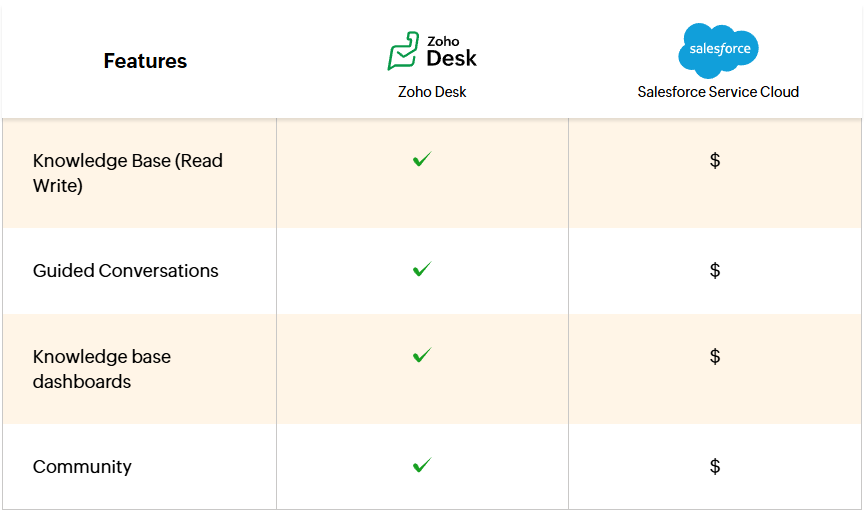
Service Cloud restricts access to the knowledge base to read-only mode. This means that additional extensions are required to manage articles and create content within the knowledge base. The system offers a help center with basic functionalities, which limits the ability to effectively support customers. Furthermore, community support and community metrics are also available as add-ons.
With Zoho Desk, you can customize your help center to match your brand identity, support customers globally with a multilingual knowledge base, reduce agent workload with Zia and Guided Conversations, and enable customers to help each other through community features.
AI
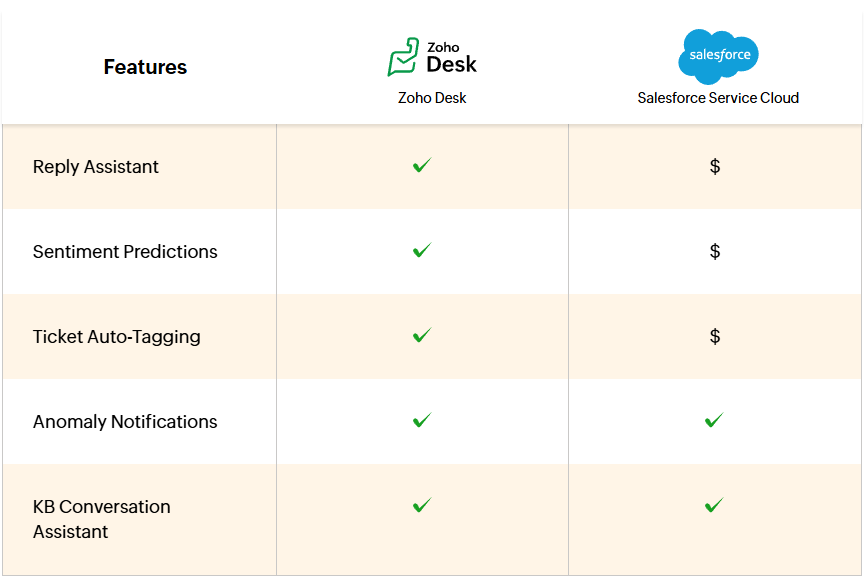
Salesforce Service Cloud Enterprise Edition offers anomaly notifications that alert managers to an increase in incoming tickets. However, other essential features, such as sentiment analysis, automatic ticket tagging, or response assistant, are available as add-ons.
In Zoho Desk, all AI features are natively available. Zia in Zoho Desk can answer frequently asked customer questions, allowing agents to focus on more complex issues. Thanks to Zia's sentiment analysis, agents can tailor their service approach to the customer's mood. Additionally, Zia's response assistant simplifies the process of preparing customer communications.
Automation
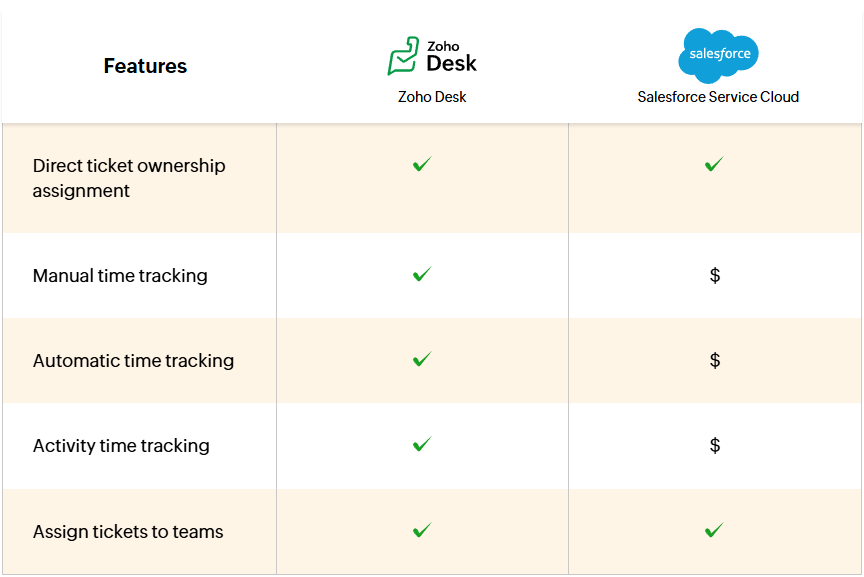
Although Salesforce Service Cloud and Zoho Desk offer similar automation capabilities, they differ in how they operate. To configure notifications, agents in Service Cloud must go through a lengthy workflow creation process. In Zoho Desk, notifications can be easily activated with a toggle switch, and built-in, customizable time tracking options are available.
In Salesforce, tracking the time agents spend on each case requires using third-party integrations. Additionally, another add-on is needed to synchronize time reports with Service Cloud.
Customization
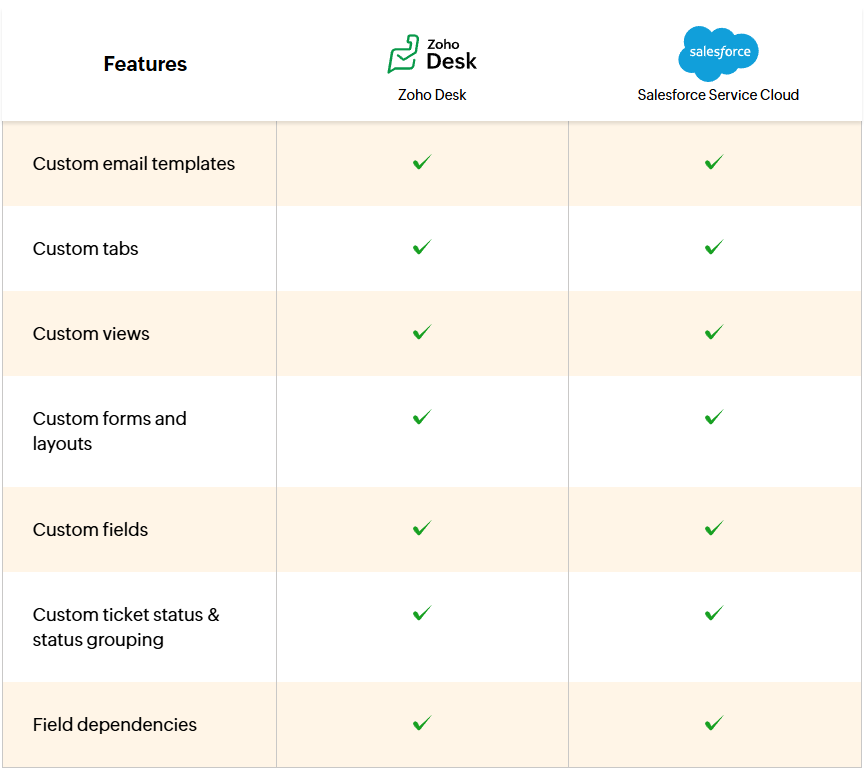
Salesforce Service Cloud and Zoho Desk offer similar customization features. In both applications, you can add custom fields and customize page, ticket, and form layouts. You can also personalize the help desk by creating department-specific layouts and collecting information across different teams and modules, such as tickets or contacts. Customization also allows you to map your company's domain to the help desk system and serve customers in their preferred language.
Analytics
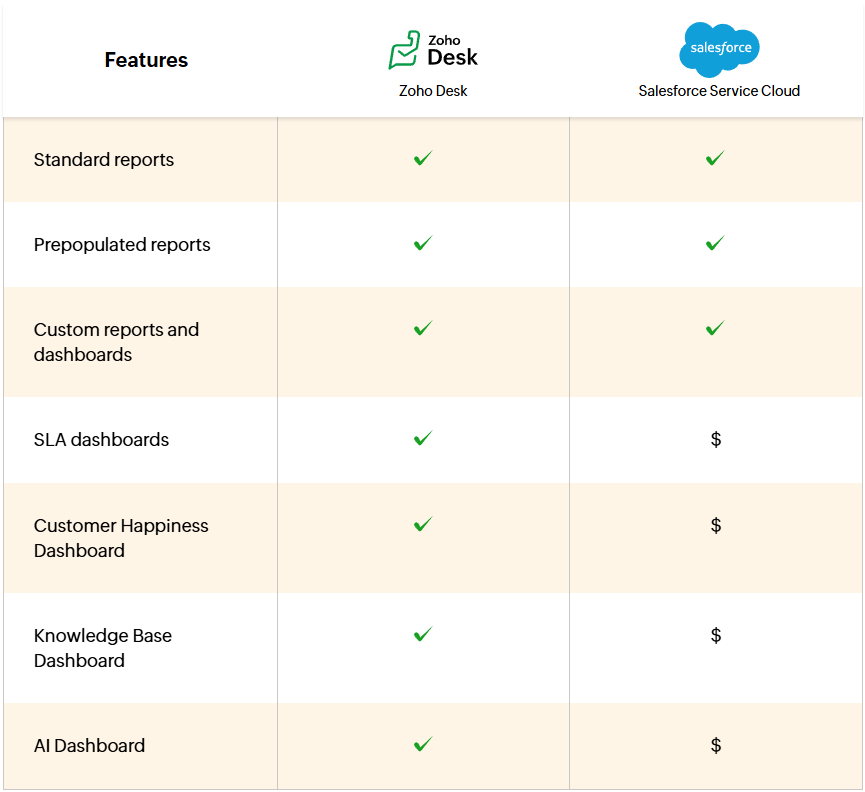
Salesforce Service Cloud's analytical tools can significantly impact your budget. To conduct deeper analysis of survey responses and AI performance, two different add-ons are required.
Zoho Desk provides all key information in one centralized location—from business efficiency to customer satisfaction metrics. Reports and dashboards can be generated with a single click. Thanks to automatic data synchronization, Zoho Desk keeps you up-to-date with results and helps you quickly uncover insights that improve service and grow your business.
Summary
Salesforce Service Cloud is a comprehensive and well-known customer service solution that can be attractive to large organizations already using the Salesforce ecosystem and prepared for a more complex implementation. In practice, many essential features, such as support for selected communication channels, knowledge base management, advanced analytics, AI, time tracking, or community features, may require additional modules, integrations, or higher-tier packages. This increases the total cost of the system, extends the configuration process, and can lead to greater reliance on administrators and external vendors.
Zoho Desk is a more complete and easier-to-launch solution for businesses looking to quickly build professional multi-channel customer service, leverage AI, automation, reporting, self-service, and productivity tools without the need for continuous purchase of additional components. For organizations seeking predictable costs, faster implementation, and full integration with the Zoho ecosystem, Zoho Desk can be a more effective alternative to Salesforce Service Cloud.
If you wish to implement Zoho Desk with a trusted partner, please contact us. Link below.