
Recent months have brought a series of changes that clearly show the direction of development of this platform: greater flexibility, stronger automation, better data management and an ever deeper use of artificial intelligence. Zoho Projects becomes an environment that can be customized to your own operational, reporting, and project processes, instead of being limited to the standard work model imposed by the standard Project Management system, focused on managing tasks and schedules.
Below we discuss the most important news and changes that have appeared in Zoho Projects in recent times.
New version of Timesheets
One of the more noticeable changes was the redesign of the Timesheets module. So far, the timesheet has been in practice primarily a view of data on recorded working time. Currently, its role has been expanded.
Timesheet now functions as a separate, collective object grouping time logs. It can cover a period of up to 31 days, be saved as a draft, and then submitted for approval. You can also withdraw the requested timesheet or make changes to it.
In practice, this means putting in order the process of accounting for working time. There is a clear intermediate stage between the very recording of time and its approval. For organizations that account for project hours, team work, or resource load, this is a significant change to increase control over the entire process.
It is worth remembering that the functionality works with the appropriate configuration of the acceptance mechanism at the Timesheet level in the portal settings.


User Automation - user-driven workflow
Another important change is the introduction of User Automation. Zoho Projects has expanded the workflow rules area with a dedicated “Users” tab, so that automations can be created not only for projects, tasks or requests, but also directly for portal users.
This is a seemingly small change, but its significance is great. Until now, automation in Zoho Projects has focused mainly on objects related to the implementation of project work. It is now possible to automate administrative and access activities as well.
In practice, this can mean fewer operations performed manually by administrators, more consistency in user management, and better organization of internal processes.

Expanded Recycle Bin functionality
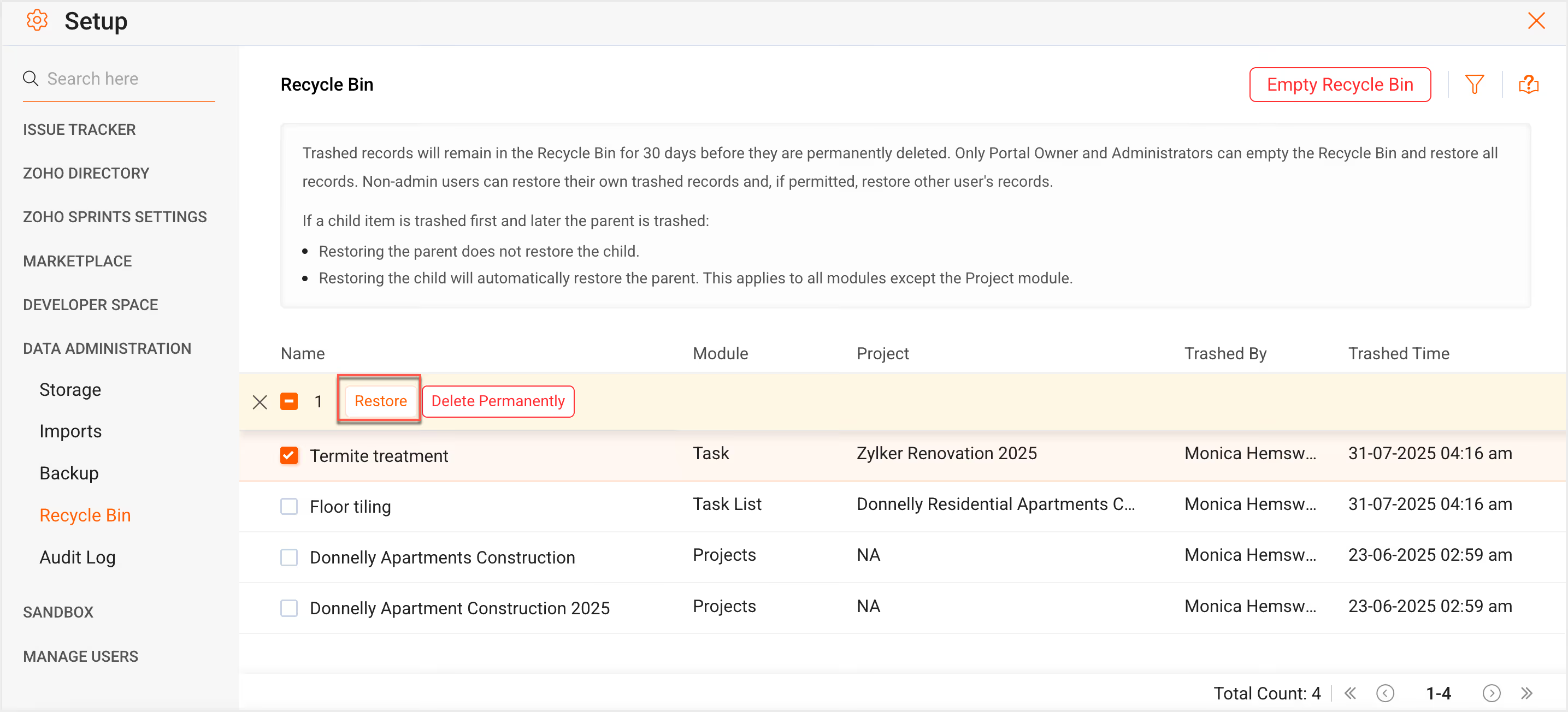
Zoho Projects has also expanded the Recycle Bin feature. It now includes a wider range of elements than before, including projects, phases, task lists, tasks, issues, and project templates.
Deleted items can be managed centrally from Data Administration. Administrators have the option to restore or permanently delete them. It is also important that the documentation indicates the impact of operations performed in the recycle bin on related data, such as time logs or integrations with other Zoho applications.
From the point of view of the organization, this is an important change in the area of data security. It increases the margin of safety when working on projects and gives you a better chance of recovering information that has been deleted by mistake.

Custom Modules - more flexibility of the data model
One of the most important novelties is Custom Modules. This is functionality that clearly shows that Zoho Projects is evolving towards a more customizable process platform.
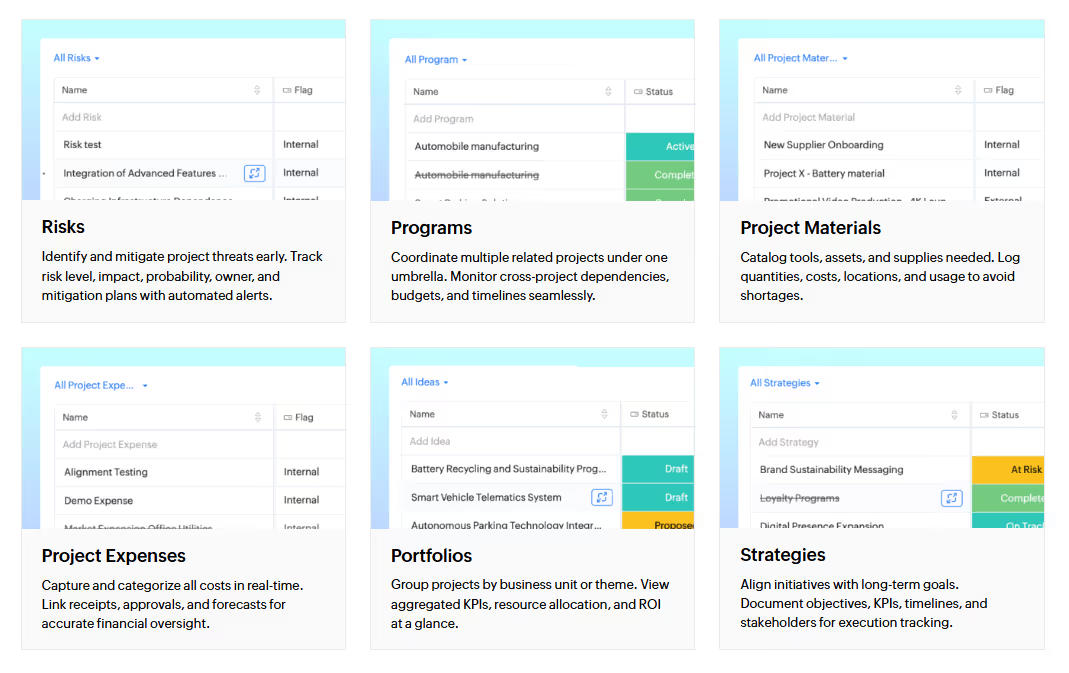
Custom Modules allow you to create your own data modules that complement the standard structure of the system. This allows you to store information specific to a given business process, and not just use predefined modules available in the system.
Zoho differentiates between modules at the organizational and design level here. This means that part of the data can be global for the entire portal, and some can be limited to a specific project only. Modules have their own layouts, sections, fields, permissions and can be covered by automations.
This is a very important change from a business perspective. In practice, this means that Zoho Projects can be used not only to manage tasks, but also to model additional processes, such as risks, receipts, materials, acceptances, operational records, or other areas specific to an organization.


Module Gallery - start new processes faster
Along with Custom Modules, Zoho also introduced the Gallery Module. Thanks to it, the user can not only build modules from scratch, but also use ready-made, predefined structures available in the gallery.
This solution is especially useful where the organization wants to act quickly. Instead of designing the entire data structure from scratch, you can start with a ready-made template and later develop it according to your needs.
In practice, this reduces the time to implement new processes and lowers the entry threshold for teams that want to take advantage of the more advanced capabilities of the system, but do not want to go through the full stage of data architecture design right away.
Extensions in Custom Reports
Significant changes have also occurred in the area of reporting. Custom Reports has been developed so that users can create project reports based on their own criteria for modules such as Tasks, Issues, Time Logs and Phases.
A particularly important extension is KPI Customizations. Users can decide how indicators are presented, including units, alignment, and the number of decimal places.
At first glance, this may seem like a minor improvement, but in practice it affects the readability of the data and the usability of dashboards. Reporting in a business environment is not just about showing data. The way they are presented and the possibility of adapting them to the context of the recipient also matters.
This is a step towards a more mature approach to project analytics, where the report is not only meant to exist, but to support operational and management decisions.


Zoho Sign Integration
In December, Zoho also expanded integrations with Zoho Sign. This made it possible to send documents for signature directly from tasks and requests in Zoho Projects.
The extension works in the side panel of the record and allows you to both add a new file and use an already existing attachment. In practice, this simplifies the connection of design work with document flow.
For companies, this means less switching between applications and better embedding formal processes, such as approvals and signatures, into the day-to-day work of the project team. This is especially important where projects involve documentation that requires approval from customers, suppliers or internal stakeholders.

Zoho DAP integration
In January, Zoho Projects added integration with Zoho DAP, or Digital Adoption Platform. It is a solution that supports user onboarding and effective implementation of new functions.
With Zoho DAP, you can create walkthroughs, interactive videos, guides, banners, and central help hubs. Importantly, this type of content can be published contextually directly within the system.
From an implementation perspective, this is of great importance. The user receives support exactly in the place where he performs a certain action. This reduces the number of errors, accelerates adaptation to changes and reduces the burden on administrative or support teams.
For organizations developing the Zoho Projects environment, this can be a very practical tool to support the adoption of the system.


AI Hub and AI integrations
February brought one of the most strategic directions of development: AI Hub. This is an area that consolidates the AI features available in Zoho Projects.
As part of the AI Hub, users can use Zia Search, Zia Insights, translations, summaries, content generation and automatic task creation, among others. In addition, AI Bridge allows the integration of external AI engines using API keys. Zoho indicates the possibility of using solutions such as Zia, ChatGPT, Gemini, Anthropic or Cohere.
This is an important change not because AI appears in the system, but because it ceases to be a single function. It begins to act as a common layer present in different modules and work scenarios.
In practice, this means a more consistent use of AI: from data analysis, to user support, to content creation and automation of parts of operational tasks.
Read more >>


Zoho Projects Infinity - a new stage in the development of the platform
The newest element of Zoho's communication around the product is Zoho Projects Infinity. It's not so much a single feature as a new take on the entire platform.
Zoho emphasizes in it that modern teams should not adapt to the limitations of the tool. This tool should adapt to the way the organization works. It is in this context that custom modules, custom reports, custom dashboards and the AI layer embedded in the daily design work are shown.
In communication around Zoho Projects Infinity, several directions are strongly voiced:
- building your own modules tailored to real business processes,
- reporting and dashboards designed for specific teams and decision makers,
- AI development in the area of summaries, task generation and data analysis,
- further plans related to MCP, AI agents and the creation of projects and modules with the help of Zia.
This shows that Zoho Projects is no longer a tool understood solely as a task management system. Increasingly, it is becoming a flexible platform for managing work, processes and information within projects.
Read more >>
What these changes mean in practice for companies
If you look at all the novelties described together, it is clear that Zoho Projects is developing in three main directions.
The first is Greater flexibility of the data model. With Custom Modules and Module Gallery, companies can map their own processes much more accurately than before.
The other is automation and organization of operations. Examples are new Timesheets, User Automation or integrations embedded directly in the project work.
The third is Increasingly mature use of AI. Zoho no longer treats AI as a single add-on, but as a common layer supporting different areas of work.
For organizations, this means an opportunity to better adapt the system to its own operational realities, reduce manual labor, more useful reporting, and faster deployment of new users and functions.
Summary
The recent changes in Zoho Projects show a very clear direction of development. The platform becomes more flexible, more customizable, and better equipped to handle processes beyond classic task management.
The new Timesheets organize the accounting of working time. User Automation extends the scope of workflow. Recycle Bin increases data security. Custom Modules and Module Gallery open the way to model your own processes. Custom Reports develop analytics. Integrations with Zoho Sign and Zoho DAP enhance the operational dimension of the system. AI Hub and Zoho Projects Infinity show that Zoho is building a platform ready for a new stage of work with projects and data.
For companies that are looking for a tool that evolves towards greater flexibility and real operational support, this is definitely a direction worth considering.